Part 3 of 3: Reliable backends with just your database This is the last part.
Your order service saves a new order and then tells the rest of the company
about it by publishing an order_created event to Kafka (or RabbitMQ, or
SNS). Billing listens. Shipping listens. Email listens.
That is two writes to two different systems. Sooner or later one of them works and the other doesn’t. This is called the dual write problem, and the transactional outbox is the standard fix. It needs one extra table and one small background process.
Short version:
- Don’t publish the event directly. Write it to an
outboxtable in the same database transaction as the order. - A separate process reads the outbox and publishes the events.
- Events are delivered at least once, so consumers must handle duplicates. In return, no event is ever lost, and no event is sent for data that was never saved.
The dual write problem
Here is the code most services start with:
save order to database
publish order_created to Kafka
Look at what can go wrong between those two lines:
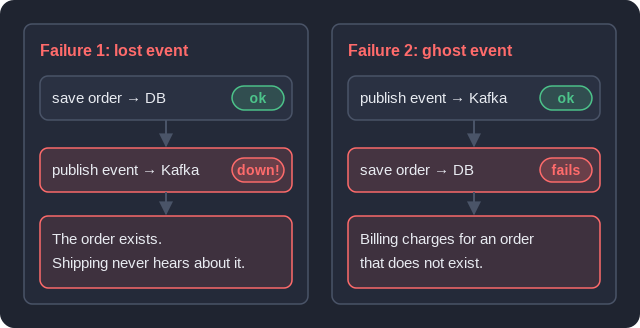
Swapping the order of the two lines only swaps which failure you get. The process can also crash between the lines, which has the same effect as Kafka being down.
“Can’t I publish after the transaction commits?”
That is failure 1. The commit worked, then the publish failed or the process was killed during a deploy. The event is gone and nothing will ever retry it.
“Can’t I use a distributed transaction?”
In theory, two-phase commit (2PC, also called XA) makes two systems commit together. In practice most message brokers don’t support it, and the ones that do make every write slower and harder to run. Almost nobody does this for events.
The fix: write the event to your own database
Your database can already save several rows atomically. So save the event as a row, next to the order:
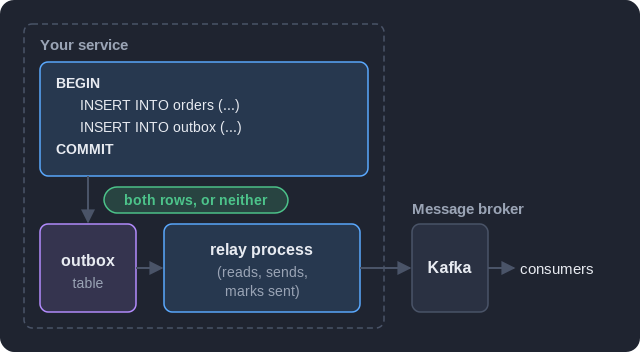
The order and the event now live or die together. If the transaction rolls back, there is no event. If it commits, the event is safely stored, and the relay will send it, even if Kafka is down for an hour.
The outbox table
CREATE TABLE outbox (
  id             bigserial   PRIMARY KEY,
  aggregate_type text        NOT NULL,   -- 'order'
  aggregate_id   text        NOT NULL,   -- '881', also the Kafka key
  event_type     text        NOT NULL,   -- 'order_created'
  payload        jsonb       NOT NULL,
  created_at     timestamptz NOT NULL DEFAULT now(),
  sent_at        timestamptz
);

CREATE INDEX outbox_unsent_idx ON outbox (id) WHERE sent_at IS NULL;
“Aggregate” is a fancy word for “the thing the event is about”. Here it is
the order. aggregate_id will matter when we talk about ordering.
Writing an event is a plain insert inside your existing transaction:
BEGIN;

INSERT INTO orders (id, customer_id, total) VALUES (881, 42, 25.00);

INSERT INTO outbox (aggregate_type, aggregate_id, event_type, payload)
VALUES ('order', '881', 'order_created',
        '{"order_id": 881, "customer_id": 42, "total": "25.00"}');

COMMIT;
The relay: two ways to read the outbox
Option 1: polling
A small loop asks the table for unsent events every second or so:
BEGIN;

SELECT id, aggregate_id, event_type, payload
FROM outbox
WHERE sent_at IS NULL
ORDER BY id
LIMIT 100
FOR UPDATE SKIP LOCKED;

-- publish each row to Kafka and wait for Kafka to confirm

UPDATE outbox SET sent_at = now() WHERE id = ANY($sent_ids);

COMMIT;
FOR UPDATE SKIP LOCKED lets you run more than one relay without two of
them grabbing the same rows. It is the same trick used to build a job queue
in Postgres, and that post explains
how it works.
One detail that catches people out: don’t track progress with “give me rows
with id greater than the last one I sent”. A bigserial id is handed out
when the row is inserted, not when the transaction commits. A slow
transaction can commit id 100 after id 101 is already sent, and a “greater
than” relay will skip 100 forever. Querying sent_at IS NULL avoids that.
Option 2: change data capture (CDC)
Every database keeps a log of changes for crash recovery and replication: the WAL in Postgres, the binlog in MySQL and MariaDB. A CDC tool such as Debezium reads that log and publishes each new outbox row as it is committed. Your code doesn’t poll at all.
Which one?
| Polling | CDC (log reading) | |
|---|---|---|
| Setup | A loop in your service | A separate tool to run and watch |
| Delay | Your poll interval (~1 second) | Usually under a second |
| Load on DB | One small query per poll | Reads the log, no queries |
| Commit order | Needs care (see above) | Follows commit order |
| Best for | Starting out, most services | High volume, many services |
Start with polling. It is boring and easy to debug. Move to CDC when you can measure that polling delay or database load is a problem.
Duplicates are part of the deal
Look at the relay again. It publishes to Kafka, then marks the rows as sent. What if it crashes between those two steps?
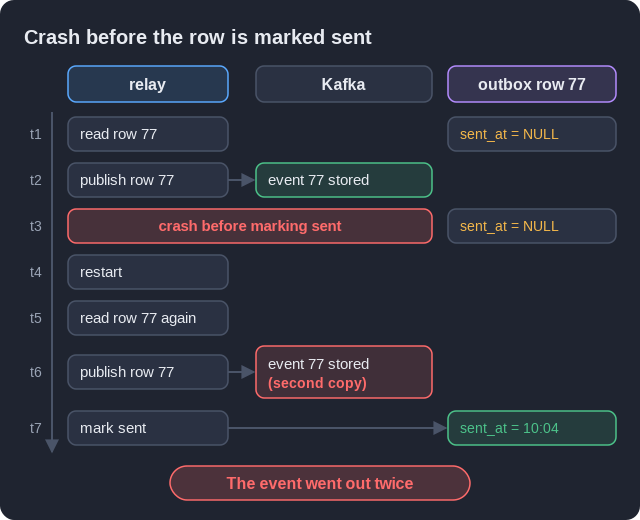
The event went out twice. You can’t fully prevent this, so the outbox gives you at-least-once delivery: every event arrives, maybe more than once.
The answer is to make consumers safe to repeat. Include a unique event id in
the payload (the outbox id works), and have each consumer remember what it
has handled:
-- in the consumer's database
CREATE TABLE processed_events (
  event_id     bigint      PRIMARY KEY,
  processed_at timestamptz NOT NULL DEFAULT now()
);

BEGIN;

INSERT INTO processed_events (event_id) VALUES (77)
ON CONFLICT (event_id) DO NOTHING
RETURNING event_id;

-- no row returned: already handled, COMMIT and stop
-- row returned: do the work in this same transaction

COMMIT;
This is sometimes called an “inbox” table. It is the same idea as an idempotency key: save “I am handling this” in the same transaction as the work.
Ordering: same order, same key
Consumers often care about order. order_shipped arriving before
order_created will confuse shipping.
Two rules keep the order right:
- Publish with
aggregate_idas the message key. Kafka keeps messages with the same key in one partition, in order. Events for order 881 stay in order, while events for different orders can be handled in parallel. - Don’t let two relays send events for the same order at the same time.
With several polling relays and
SKIP LOCKED, relay A might holdorder_createdwhile relay B sendsorder_shippedfor the same order. Either run one relay, or split rows between relays byhash(aggregate_id)so each order always goes through the same relay.
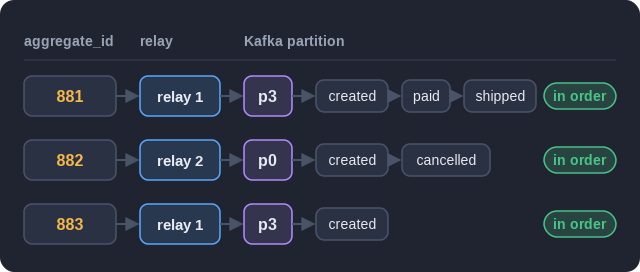
Order is only kept per order, not across all orders. That is almost always what you want, and it is what lets you scale.
Keeping the outbox small
The outbox only needs to hold events until they are sent. Delete sent rows on a schedule:
DELETE FROM outbox
WHERE sent_at < now() - interval '3 days';
Keeping a few days helps when you need to check what was sent. In Postgres, a table that gets lots of inserts and deletes also needs autovacuum to keep up. The same tuning tips from the job queue post apply.
The one metric to watch: outbox lag
If the relay stops, nothing errors. Orders save fine. Events just stop flowing, and you find out when a customer asks where their parcel is.
So watch the age of the oldest unsent event:
SELECT now() - min(created_at) AS outbox_lag,
       count(*)                AS unsent
FROM outbox
WHERE sent_at IS NULL;
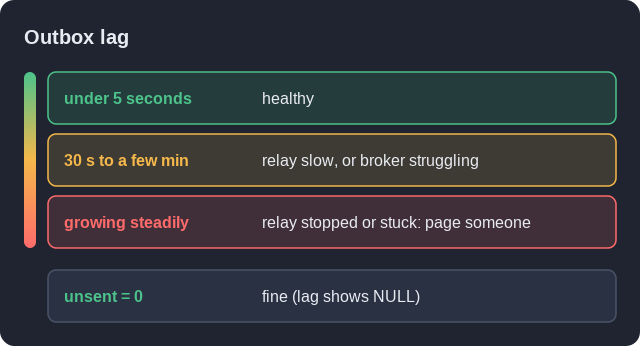
Alert when the lag passes a limit that fits your business, for example two minutes.
When you don’t need an outbox
- Only one system is involved. If the consumer reads the same database, a job in a jobs table does the same thing with less machinery.
- Losing an event is fine. Analytics clicks, “user viewed page” counters. Fire and forget is simpler.
- The event is the source of truth. In event sourcing, you write only the event, so there is no second write to keep in sync.
Questions people ask
Is the outbox the same as event sourcing? No. With an outbox, your normal tables are the truth and events are announcements about changes. With event sourcing, the events themselves are the truth.
Doesn’t this double my database writes?
Each event adds one insert, and later one update and one delete. For most
services that is small next to the business writes. If it ever matters, CDC
removes the update, because it doesn’t need a sent_at column.
Can the relay live inside my service?
Yes, and that is the easy way to start. Run it as a background loop. With
SKIP LOCKED, every copy of your service can run one safely, as long as you
handle the ordering rule above.
What about MySQL?
The pattern is the same. MySQL 8.0 supports SKIP LOCKED for polling, and
Debezium can read the MySQL binlog for CDC.
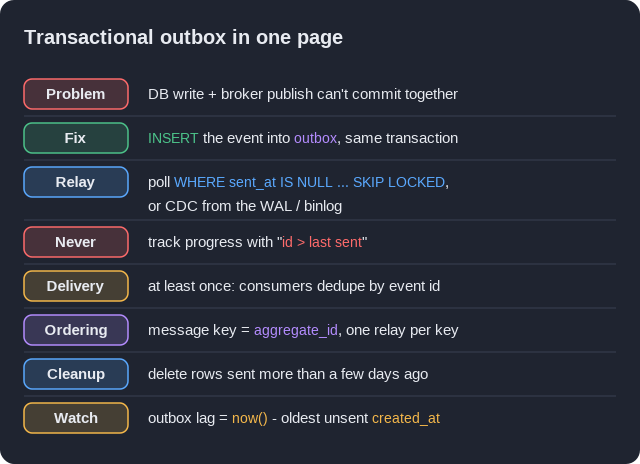
Cheat sheet
Further reading
- microservices.io: Transactional outbox
- AWS Prescriptive Guidance: Transactional outbox pattern
- Debezium: Outbox Event Router

Backend engineer who builds high-volume systems that move money. More about Rafi