Part 1 of 3: Reliable backends with just your database Next: Idempotency Keys Explained: How to Make API Retries Safe
You need background jobs. Send the welcome email, resize the photo, call the slow partner API. The usual answer is “add Redis and a queue library”. That is one more server to run, watch, back up and pay for.
If you already use PostgreSQL, you can run a solid job queue inside it. The
key is two words in a SELECT: SKIP LOCKED. This post shows how it works,
gives you a schema you can copy, and then spends real time on the part most
posts skip: how it fails when traffic grows.
Short version:
FOR UPDATE SKIP LOCKEDlets many workers pull jobs from one table without ever picking the same job twice.- The big win over Redis: you can add a job in the same transaction as your business data. Either both are saved or neither is.
- It breaks in three ways: table bloat, long transactions, and too many workers fighting over the same rows. All three are easy to watch for.
The problem: two workers, one job
Say you have a jobs table and two workers. Each one runs “give me the oldest
pending job”. Without any locking, this happens:
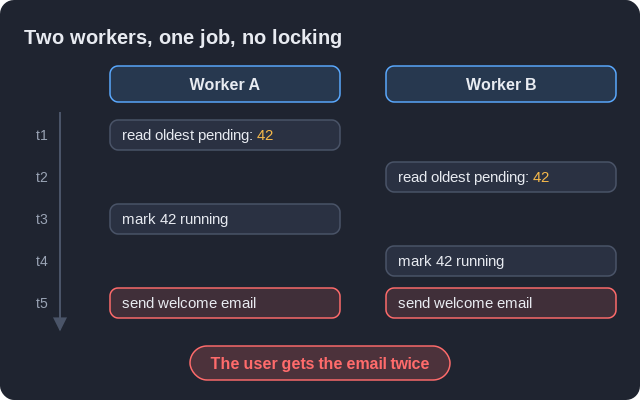
Both workers read the row before either one changed it. The classic fix is
SELECT ... FOR UPDATE, which locks the row. Now worker B waits for worker A.
That stops the double send, but your workers now queue up behind each other.
Ten workers act like one.
What SKIP LOCKED does
SKIP LOCKED tells Postgres: “if a row is already locked by someone else,
don’t wait for it. Pretend it isn’t there and give me the next one.”
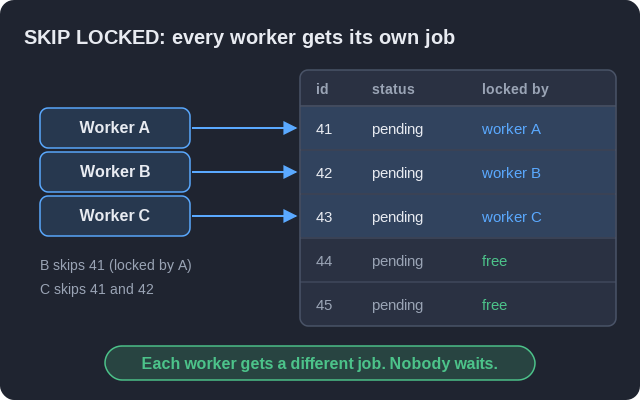
That is the whole trick. It has been in PostgreSQL since version 9.5 (2016), so any Postgres you run today has it. The PostgreSQL docs on the locking clause describe it, and they say plainly that it is meant for queue-like tables, because it gives you an inconsistent view of the data on purpose.
A schema you can copy
CREATE TABLE jobs (
  id           bigserial   PRIMARY KEY,
  kind         text        NOT NULL,          -- 'send_email', 'resize_image'
  payload      jsonb       NOT NULL,
  status       text        NOT NULL DEFAULT 'pending',
                                              -- pending | running | done | dead
  run_at       timestamptz NOT NULL DEFAULT now(),
  attempts     int         NOT NULL DEFAULT 0,
  max_attempts int         NOT NULL DEFAULT 5,
  locked_until timestamptz,
  last_error   text,
  created_at   timestamptz NOT NULL DEFAULT now()
);

-- Only pending jobs are in this index, so it stays small
-- even when the table holds millions of finished jobs.
CREATE INDEX jobs_pending_idx ON jobs (run_at) WHERE status = 'pending';
A few choices worth explaining:
run_atlets you schedule a job for later, and it is also how retries back off. A failed job getsrun_at = now() + 1 minute, then 4 minutes, and so on.locked_untilis a lease. More on that below.- The partial index (
WHERE status = 'pending') matters more than it looks. Workers only ever search pending jobs, and there are usually few of them.
Claiming a job
There are two styles. Pick one.
Style 1: hold the transaction open
BEGIN;

SELECT id, kind, payload
FROM jobs
WHERE status = 'pending' AND run_at <= now()
ORDER BY run_at
LIMIT 1
FOR UPDATE SKIP LOCKED;

-- ... the worker does the job here, while the row stays locked ...

UPDATE jobs SET status = 'done' WHERE id = $1;
COMMIT;
The nice part: if the worker crashes, its connection drops, Postgres rolls the transaction back, and the row is free again. Crash recovery comes for free.
The bad part: every running job holds a database connection and an open transaction for as long as the job takes. A 30 second job means a 30 second transaction. We will see why that hurts in the “when it breaks” section.
Style 2: take a lease, then let go
UPDATE jobs
SET status       = 'running',
    attempts     = attempts + 1,
    locked_until = now() + interval '5 minutes'
WHERE id = (
  SELECT id
  FROM jobs
  WHERE status = 'pending' AND run_at <= now()
  ORDER BY run_at
  LIMIT 1
  FOR UPDATE SKIP LOCKED
)
RETURNING id, kind, payload, attempts;
This claims the job in one short statement and commits right away. The worker then does the job with no transaction open. When it finishes:
UPDATE jobs
SET status = 'done', locked_until = NULL
WHERE id = $1 AND attempts = $2;   -- only if we still own it
That attempts = $2 check is important. If the worker took longer than the
lease, another worker may have picked the job up again. The check stops the
slow worker from marking someone else’s attempt as done.
Something has to rescue jobs whose worker died. Run this every minute from any worker:
UPDATE jobs
SET status = 'pending', locked_until = NULL
WHERE status = 'running' AND locked_until < now();
Here is how a lease plays out when a worker dies:
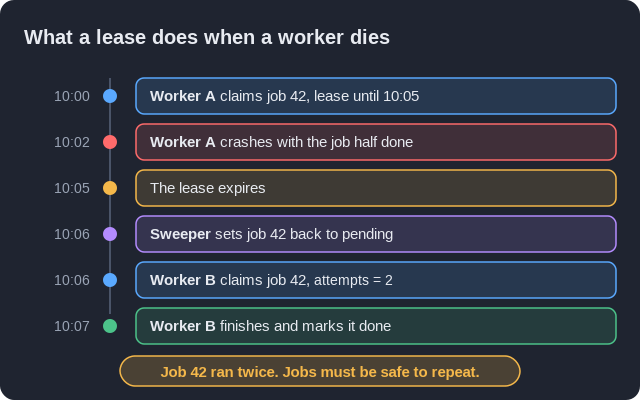
Notice that job 42 ran twice, or at least partly twice. With leases, a job can always run more than once. So write jobs that are safe to repeat. The post on idempotency keys shows how.
Which style should you use?
| Hold transaction | Lease | |
|---|---|---|
| Crash recovery | Automatic | Needs a sweeper |
| Connections used | One per running job | Only while claiming |
| Long jobs (> a few seconds) | Hurts the whole database | Fine |
| Can a job run twice? | Rarely | Yes, after a lease expires |
| Best for | Short jobs, low volume | Most real workloads |
My default is the lease. Jobs that call other services are slow, and slow transactions cause the worst problems in Postgres.
The best part: enqueue in the same transaction
This is the feature that a separate Redis queue cannot give you.
BEGIN;

INSERT INTO users (email) VALUES ('[email protected]') RETURNING id;

INSERT INTO jobs (kind, payload)
VALUES ('send_welcome_email', '{"user_id": 1001}');

COMMIT;
Either the user and the job are both saved, or neither is. Compare that with a separate queue:
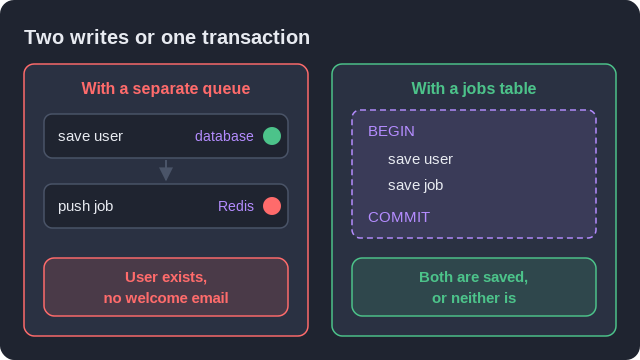
The reverse also happens with a separate queue: the job is pushed, then the database transaction rolls back, and a worker emails a user who does not exist. The transactional outbox post goes deeper into this “two writes” problem.
Waking workers up: polling vs LISTEN/NOTIFY
Workers need to know when a new job shows up. Two options:
- Polling. Each worker runs the claim query every second or so. Simple and reliable. With the partial index, an empty check costs very little.
- LISTEN/NOTIFY. Workers run
LISTEN jobs_ready;. Whoever inserts a job also runsNOTIFY jobs_ready;. The notice is only sent when the transaction commits, so a worker never wakes up for a job it can’t see yet.
Use NOTIFY to wake workers faster, but keep a slow poll (every 5 to 10
seconds) as a safety net. Notices are not stored. A worker that was
restarting when the notice went out never gets it. Also, under heavy write
load, NOTIFY takes a lock at commit time that is shared across the whole
database, and some teams have hit that at scale. If you insert thousands of
jobs a second, measure before you rely on it.
Retries and dead jobs
When a job fails, record the error and push it into the future:
UPDATE jobs
SET status       = CASE WHEN attempts >= max_attempts
                        THEN 'dead' ELSE 'pending' END,
    run_at       = now() + (interval '1 minute' * power(2, attempts)),
    locked_until = NULL,
    last_error   = $2
WHERE id = $1;
With power(2, attempts), the waits are 2, 4, 8, 16 minutes. After five tries
the job is dead, and a person looks at it. Dead jobs are your alarm. Put a
count of them on a dashboard.
When it breaks
Everything above works well for most apps. Here are the three ways it goes wrong as you grow, and how to spot each one early.
1. Bloat: the table fills up with dead rows
In Postgres, an UPDATE does not change a row in place. It writes a new copy
and marks the old one as dead. A job that goes pending, running, done leaves
dead copies behind. A cleanup process called autovacuum removes them later.
A queue table changes all day long, so dead rows pile up faster than in a normal table. When autovacuum can’t keep up, the table and its indexes grow, and the claim query slows down because it has to step over dead rows.
What helps:
- Delete finished jobs, or move them to an archive table, instead of keeping
millions of
donerows. - Make autovacuum run more often on this one table:
ALTER TABLE jobs SET (
  autovacuum_vacuum_scale_factor = 0.01,  -- start at 1% dead rows, not 20%
  autovacuum_vacuum_cost_delay   = 0      -- don't slow it down
);
2. Long transactions stop the cleanup everywhere
Vacuum can only remove a dead row when no open transaction might still need
to see it. One transaction that stays open for 20 minutes blocks cleanup of
anything that changed in those 20 minutes, in every table, not only jobs.
This is why style 1 (hold the transaction during the job) is risky. One stuck
job, or one forgotten BEGIN in a console, and the queue table bloats.
3. Too many workers fighting over the head of the queue
SKIP LOCKED stops workers from waiting, but they still all look at the same
few rows at the front of the queue. With dozens of workers and a high job
rate, they spend more and more time skipping each other’s locked rows. Some
write-ups report throughput falling off a cliff at this point instead of
leveling out.
As a rough rule of thumb (not a benchmark): thousands of jobs per minute is
comfortable. Hundreds of jobs per second with many workers is where you need
to test carefully, claim jobs in batches (LIMIT 10 instead of LIMIT 1), or
look at a dedicated queue.
The health check card
Put these two queries on a dashboard. They catch all three problems early.
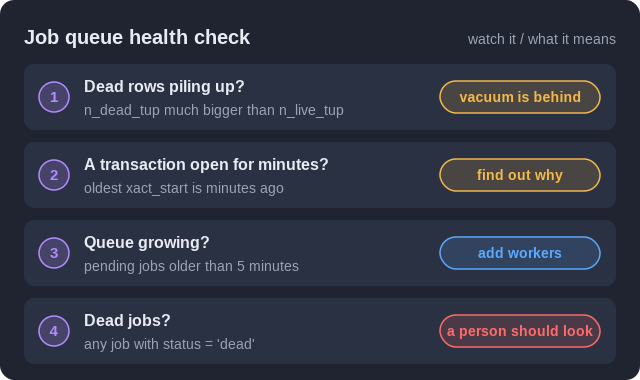
-- 1. Dead rows in the jobs table
SELECT n_live_tup, n_dead_tup, last_autovacuum
FROM pg_stat_user_tables
WHERE relname = 'jobs';

-- 2. The oldest open transactions
SELECT pid, now() - xact_start AS open_for, state, left(query, 60)
FROM pg_stat_activity
WHERE xact_start IS NOT NULL
ORDER BY open_for DESC
LIMIT 5;

-- 3 and 4. Queue backlog and failures
SELECT status, count(*), min(run_at) AS oldest
FROM jobs
WHERE status IN ('pending', 'dead')
GROUP BY status;
Should you use Postgres, Redis or Kafka?
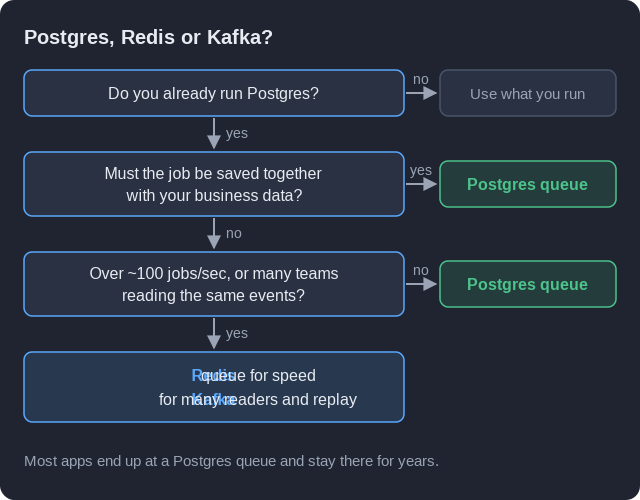
Most apps land on “Postgres queue” and stay there for years. Moving later is not hard, because the code that claims and finishes jobs is small.
Questions people ask
Is SKIP LOCKED safe? Can two workers ever get the same job?
Not at the same time. A locked row is invisible to other SKIP LOCKED
queries until the lock is released. A job can run twice only after a lease
expires or a transaction rolls back, which is why jobs should be safe to
repeat.
Does this work in MySQL?
Yes. MySQL 8.0 and MariaDB 10.6 also support FOR UPDATE SKIP LOCKED. The
bloat details differ, but the pattern is the same.
Should I use a library? Often, yes. Libraries such as River (Go), Oban (Elixir), Graphile Worker (Node) and Solid Queue (Ruby) are built on this pattern and handle retries, scheduling and the sweeper for you. Knowing how they work helps you debug them.
Can I use SQLite for this?
SQLite allows only one writer at a time, so there is no row locking to skip.
A single worker process with a simple UPDATE ... RETURNING works fine. See
how SQLite locks work for why.
Cheat sheet
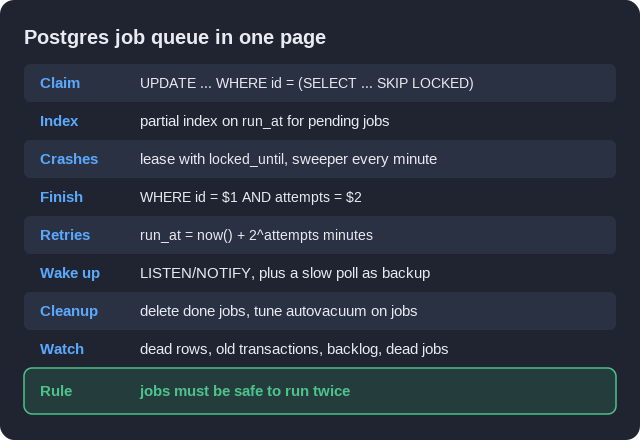
Further reading
- PostgreSQL docs: the locking clause
- PostgreSQL docs: routine vacuuming
- Understanding PostgreSQL locks on this site

Backend engineer who builds high-volume systems that move money. More about Rafi