Part 1 of 3: Money in your database Next: Double-Entry Ledger in Postgres: Enforce the Rules in the Database
A shop prices an item at 19.99. The code turns that into cents with
price * 100, cuts off the decimals, and sends 1998 to the payment provider.
The customer is charged 19.98. Nobody typed a wrong number. A float could not
hold 19.99 exactly, and the cut-off threw the error away in the wrong
direction.
Integer cents fixes that charge. Then the next problems arrive: yen has no cents, Kuwaiti dinars have three decimals, one ether is 10^18 wei, and 10.00 split three ways does not divide.
Short version:
- Store money as whole minor units (cents, yen, fils) in an integer column,
with the currency code next to it. Use
numericfor rates, and for values that do not fit in 64 bits. - Do not use floats. Avoid the Postgres
moneytype: its output depends on a server setting. In SQLite, useINTEGERonly. - Round once, at the end, with a rule you wrote down. When you split an amount, hand out the leftover cents so the parts add back up exactly.
This is part 1 of Money in your database. Part 2 builds a ledger on these amounts. Part 3 checks it against the bank.
Why floats fail
A float stores a number as a binary fraction. Most decimal fractions have no
exact binary form, the same way 1/3 has no exact decimal form. The
Python docs show that
the stored value for 0.1 is 3602879701896397 / 2 ** 55, which is close to
1/10 but not equal to it.
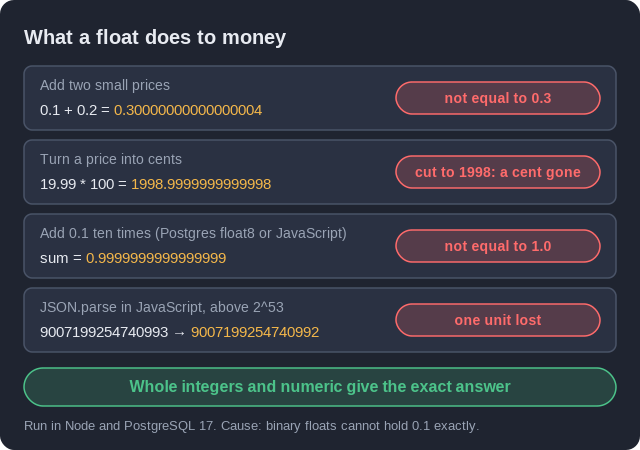
In JavaScript:
0.1 + 0.2                // 0.30000000000000004
19.99 * 100              // 1998.9999999999998
Math.trunc(19.99 * 100)  // 1998, one cent lost
PostgreSQL does the same with double precision (also called float8), and
gets it right with numeric:
SELECT 0.1::float8 + 0.2::float8 = 0.3::float8   AS float_equal,    -- false
       0.1::numeric + 0.2::numeric = 0.3::numeric AS numeric_equal; -- true
The PostgreSQL docs say it directly: “If you require exact storage and calculations (such as for monetary amounts), use the numeric type instead.”
JSON numbers in JavaScript
JSON does not limit how big a number is. JavaScript does. JSON.parse turns
every number into a double, and a double only holds whole numbers exactly up
to 2^53 - 1, which is 9007199254740991
(Number.MAX_SAFE_INTEGER).
JSON.parse('{"amount": 9007199254740993}').amount // 9007199254740992
RFC 8259 says integers in the range -(2^53)+1 to (2^53)-1 are interoperable, and that implementations may set limits on the range and precision of the numbers they accept. So an API has two safe choices:
- Integer minor units, when the amount can never pass 2^53. In USD cents that is about 90 trillion dollars, so it is fine. In wei it is only 0.009 ETH, so it is not.
- A string, when the amount can be big:
{"amount_minor": "1000000000000000001", "currency": "ETH"}. Parse it withBigIntin JavaScript.
The float can hide in any layer that maps a JSON number to a double: a
JavaScript client, a logging pipeline, an analytics job, a gateway that
rewrites bodies. Check what your database driver returns for bigint and
numeric columns too. To be sure, run 9007199254740993 through the whole path
and see what comes out the other end.
Integer minor units or NUMERIC?
A minor unit is the smallest piece of a currency you can hand over: a cent for USD, a yen for JPY. 19.99 USD is 1999 minor units. Both are exact. They differ in what the column checks for you.
bigint minor units |
numeric(p, s) |
float / double precision |
Postgres money |
|
|---|---|---|---|---|
| Exact | Yes | Yes | No | Yes, fixed fraction |
| Several currencies in one column | Yes, with a currency code | No, scale is fixed per column | n/a | No, one locale |
| Too big for the column | Error at 9.22 x 10^18 | Error beyond p digits |
Silent loss of precision | Error at about 9.2 x 10^16 with 2 decimals |
| Works in SQLite | Yes, as INTEGER |
No, fractions become REAL |
REAL only |
n/a |
| Good for | Ledgers, payments, balances | One currency, fixed decimals | Never for amounts | Avoid |
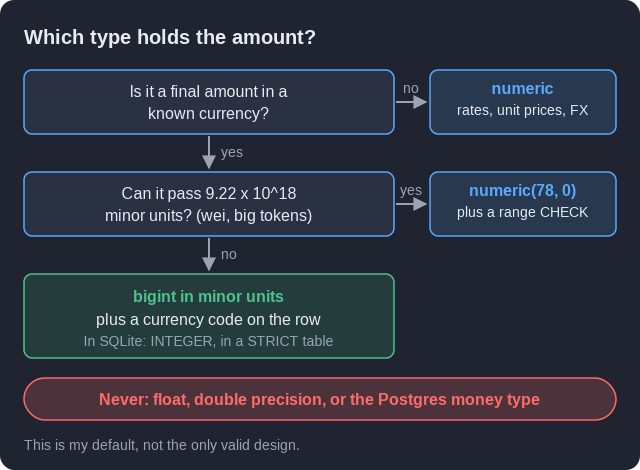
I default to bigint minor units for anything that is a final amount: a
price, a payment, a balance. The arithmetic is plain integer arithmetic, so
there is nothing to round by accident. Integer sums are also faster:
Xendit measured
numeric aggregates about 50-70% slower than integer on 10 million rows. That
is their benchmark, on their setup. Postgres returns numeric from
sum(bigint), so the sum cannot overflow, but casting it back to bigint can.
Integer cents has a cost. As one critic of the habit points out, every layer must convert between minor units and display values, and unit mistakes (cents where you meant units) become possible. 1999 is also harder to read than 19.99 when you query by hand.
I use numeric for everything that is not a final amount yet: tax rates, FX
rates, interest rates, and unit prices such as 0.0035 per request. Those have
more decimals than any currency allows.
numeric(p, s) in Postgres
numeric(p, s) holds p digits in total, s of them after the decimal
point. numeric(12, 2) holds up to 9999999999.99. Postgres rounds on insert
and raises an error if the value is too big:
CREATE TABLE z (a numeric(12, 2));
INSERT INTO z VALUES (19.999);        -- stored as 20.00
INSERT INTO z VALUES (10000000000);   -- ERROR: numeric field overflow
The catch is that the scale is fixed for the whole column. numeric(12, 2) is
wrong for JPY (no decimals) and for KWD (three decimals). If you want
numeric for amounts, either keep one table per currency scale, or use plain
numeric and put the limit in a CHECK.
Add an upper bound to that CHECK. Postgres allows NaN in a numeric
column, and treats it as bigger than every other number. I ran this:
CREATE TABLE a (amount numeric CHECK (amount > 0));
INSERT INTO a VALUES ('NaN');   -- accepted
A constrained numeric(12, 2) accepts it too. An upper bound closes the hole,
because NaN (and Infinity) is above any bound:
CHECK (amount > 0 AND amount < 1e15 AND scale(amount) <= 2)
Why I avoid the Postgres money type
The money type
is exact, but:
- Its fraction digits come from the server setting
lc_monetary. The docs warn that it “might not work to loadmoneydata into a database that has a different setting oflc_monetary”. - It holds no currency. One column, one locale.
- Dividing by an integer truncates:
SELECT '10.00'::money / 3;         -- $3.33
SELECT ('10.00'::money / 3) * 3;   -- $9.99
If you must use it, cast to numeric before dividing, as the docs suggest.
Currencies have different decimal places
ISO 4217 lists how many decimal places each currency has. In the list published on 17 September 2026, counted by currency code:
| Decimals | Count | Examples |
|---|---|---|
| 0 | 17 | JPY, KRW, VND, CLP, ISK |
| 2 | 139 | USD, EUR, GBP |
| 3 | 7 | BHD, IQD, JOD, KWD, LYD, OMR, TND |
| 4 | 2 | CLF, UYW |
| none | 13 | XAU, XAG, XDR, XXX |
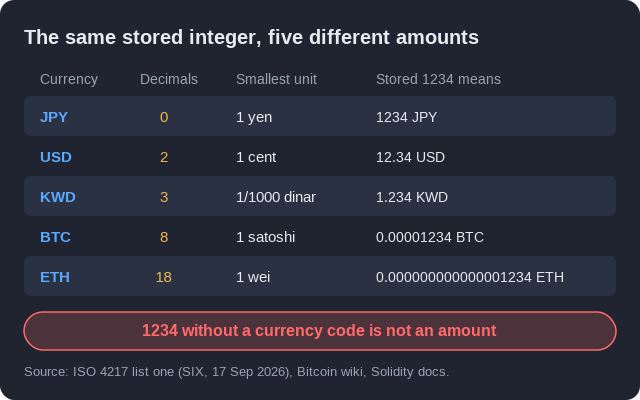
So the integer in your column only means something next to a currency code. Keep the decimals in one lookup table and store the code on every row:
CREATE TABLE currency (
  code        char(3)  PRIMARY KEY,   -- 'USD'
  minor_units smallint NOT NULL CHECK (minor_units >= 0)
);
INSERT INTO currency VALUES ('JPY', 0), ('USD', 2), ('KWD', 3);

CREATE TABLE payment (
  id           bigserial PRIMARY KEY,
  amount_minor bigint    NOT NULL CHECK (amount_minor > 0),
  currency     char(3)   NOT NULL REFERENCES currency (code)
);
Two cautions about the standard:
- Your payment provider may not follow it at the edge. Stripe’s
currency docs say ISK and UGX moved
to zero decimals but are still sent as two-decimal amounts, “where the
decimal amount is always
00”. Read your provider’s rules and convert at the boundary. - Decimals can change over time. For years of history, consider storing the decimals used at write time. That is my opinion, not a rule.
Never add amounts in different currencies
This query runs without error:
INSERT INTO payment (amount_minor, currency)
VALUES (1999, 'USD'), (500, 'JPY'), (12345, 'KWD');

SELECT sum(amount_minor) FROM payment;   -- 14844
14844 is not money. It is 19.99 USD plus 500 JPY plus 12.345 KWD added as if they were the same unit. Group by currency instead:
SELECT currency, sum(amount_minor) FROM payment GROUP BY currency;
-- JPY 500, KWD 12345, USD 1999
Crypto: the number does not fit in a bigint
Bitcoin counts in satoshi, 10^-8 BTC. A transaction output stores its value as
an int64 of satoshis (developer reference),
so it fits in 64 bits. Ethereum counts in wei, and in Solidity 1 ether == 1e18
(Solidity docs).
Wei amounts do not fit. The largest signed 64-bit integer is
9,223,372,036,854,775,807. As wei, that is only 9.22 ETH:
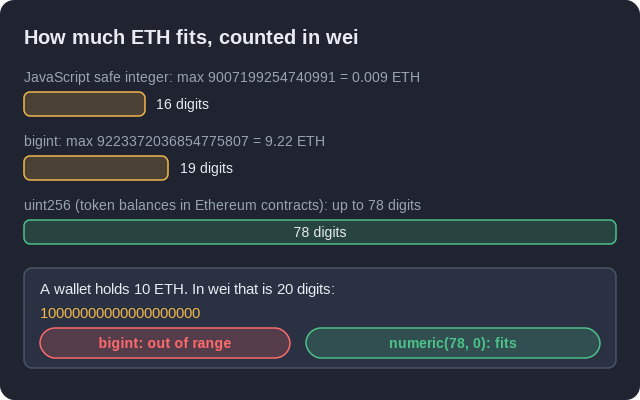
A wallet with 10 ETH holds 10000000000000000000 wei, and Postgres refuses to cast it:
SELECT (10::numeric ^ 19)::bigint; -- ERROR: bigint out of range
Token balances in Ethereum contracts use uint256 (EIP-20).
The largest uint256 is 2^256 - 1, a 78-digit number. Each token also picks
its own number of decimals; in EIP-20 the decimals() method is optional. So
store the raw integer and the token’s decimals, and use numeric(78, 0):
CREATE TABLE token_transfer (
  id     bigserial PRIMARY KEY,
  amount numeric(78, 0) NOT NULL
         CHECK (amount >= 0 AND amount < 2::numeric ^ 256)
);
The CHECK is not decoration. numeric(78, 0) accepts any 78-digit number,
and 2^256 itself has 78 digits, so the column alone lets through values
uint256 cannot hold. I inserted 2^256 into a bare numeric(78, 0) to see:
it went in.
In application code, use a big-integer type (BigInt in JavaScript, plain
int in Python), never a number or double.
SQLite: store integers
SQLite has no decimal type. Its datatype docs
list five storage classes, and REAL is an 8-byte IEEE float. A column
declared DECIMAL(10,2) gets NUMERIC affinity, and the (10,2) is ignored.
When text looks like a number, NUMERIC affinity stores it as INTEGER if
the value is a whole number, and as REAL if it is not. So one column ends up
holding different types depending on the value. I ran this on SQLite 3.51.0:
CREATE TABLE t (a NUMERIC);
INSERT INTO t VALUES ('19.99'), ('19.00'), ('19.50');
SELECT a, typeof(a) FROM t;
-- 19.99  real
-- 19     integer
-- 19.5   real
19.99 is now a float. Store integer minor units, and make SQLite enforce it with a STRICT table (SQLite 3.37.0 or newer):
CREATE TABLE payment (
  id           INTEGER PRIMARY KEY,
  amount_minor INTEGER NOT NULL CHECK (amount_minor > 0),
  currency     TEXT    NOT NULL
) STRICT;

INSERT INTO payment (amount_minor, currency) VALUES (19.99, 'USD');
-- Error: cannot store REAL value in INTEGER column payment.amount_minor
Overflow is the other trap. In SQLite, INTEGER is a signed 8-byte value, and
arithmetic that overflows does not fail. The
expression docs say the operators do
floating point arithmetic “if either operand is a real value or integer
arithmetic would produce an overflow”:
SELECT 9223372036854775807 + 1; -- 9.22337203685478e+18, a float
sum() is different: it raises an “integer overflow” error when all inputs
are integers
(aggregate docs). Know which one
you are calling. Postgres is loud here too: bigint + 1 past the maximum
raises bigint out of range. The silent kind shows up as a reconciliation
break weeks later, which is the subject of
part 3.
Rounding
Rounding happens whenever you divide, apply a percentage, convert currency or add interest. Two decisions matter: which rule, and how many times.
Half up or half even
When a value sits exactly on a tie, such as 2.5, there are two common rules:
- Half up (away from zero): 2.5 becomes 3, and -2.5 becomes -3.
- Half even (also called banker’s rounding): ties go to the even neighbour. 2.5 becomes 2, and 3.5 becomes 4.
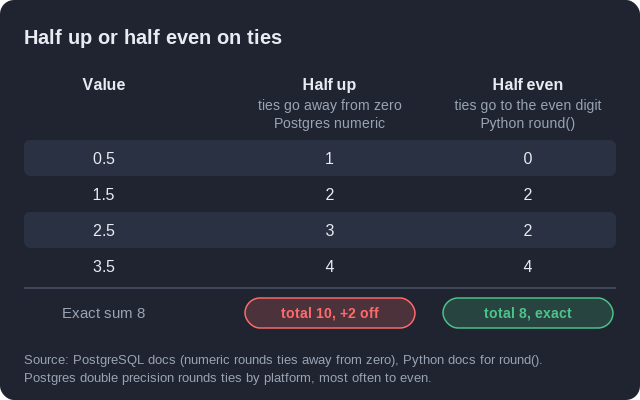
Half up pushes totals up when many values sit on ties. Half even rounds about half of the ties up and half down, so the errors cancel. Goldberg’s floating-point paper uses round to even. If a law, a contract or a partner names a rule, use theirs. If nothing does, pick one and use it everywhere.
What your tools do:
-- PostgreSQL, numeric: ties go away from zero
SELECT x, round(x::numeric) AS num_round, round(x::float8) AS dbl_round
FROM generate_series(-3.5, 3.5, 1) AS x;
--   x   | num_round | dbl_round
--  -2.5 |        -3 |        -2
--   0.5 |         1 |         0
--   2.5 |         3 |         2
The Postgres docs
say round on numeric breaks ties away from zero, while on double precision the tie behaviour “is platform dependent, but ‘round to nearest
even’ is the most common rule”. So the same round() call gives different
answers on the two types. And round(x, 2) only exists for numeric: on
float8 I got function round(double precision, integer) does not exist.
Binary floats add a second surprise: Python’s round(2.675, 2) gives 2.67 and
JavaScript’s (1.005).toFixed(2) gives "1.00", both because the float sits
just below the tie. Round exact decimals instead, such as Python’s Decimal
with quantize and an explicit rounding=.
Round once, at the end
Every rounding step loses a little. Keep full precision through the whole calculation and round once, when you produce an amount you will store or show.
For FX and interest, do not round the rate or the steps in between. Round the result, then record the amount you booked, the rate you used, and the difference, because you will want to see it later:
CREATE TABLE fx_conversion (
  id             bigserial PRIMARY KEY,
  from_currency  char(3) NOT NULL,
  from_minor     bigint  NOT NULL,
  to_currency    char(3) NOT NULL,
  to_minor       bigint  NOT NULL,   -- what we booked, rounded
  rate           numeric NOT NULL,   -- the rate we used, exactly
  rounding_minor numeric NOT NULL    -- booked minus exact, in to_currency minor units
);

INSERT INTO fx_conversion
  (from_currency, from_minor, to_currency, to_minor, rate, rounding_minor)
SELECT 'USD', 10000, 'EUR', round(10000 * r), r, round(10000 * r) - 10000 * r
FROM (VALUES (0.92347::numeric)) AS v(r)
RETURNING to_minor, rate, rounding_minor;
--  to_minor |  rate   | rounding_minor
--      9235 | 0.92347 |        0.30000
100.00 USD at a rate of 0.92347 is exactly 92.347 EUR. We book 92.35, which is
0.3 of a cent too much, and the 0.3 is recorded instead of disappearing. The
rate is a made-up example. When the two currencies have different decimals,
scale the result by 10^(to decimals - from decimals) before rounding.
Part 2 shows how
a conversion is booked as balanced entries in each currency, and where
whole-cent differences go.
Splitting an amount
Splitting 10.00 between three people is the cleanest way to see why rounding each part is wrong. Each part is 3.333…, which rounds to 3.33. Three parts of 3.33 add up to 9.99, and a cent has disappeared.
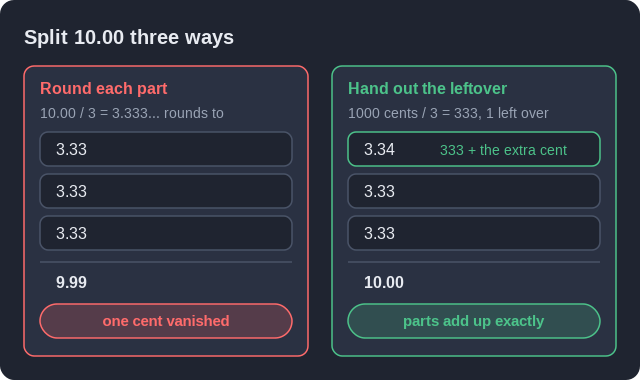
The fix is to split whole minor units and hand out the leftover one unit at a time. This is the largest remainder method:
def allocate(total_minor: int, weights: list[int]) -> list[int]:
    """Split total_minor by weights. The parts always add up to total_minor."""
    weight_sum = sum(weights)
    if weight_sum <= 0 or any(w < 0 for w in weights):
        raise ValueError("weights must be zero or more, and not all zero")

    sign = -1 if total_minor < 0 else 1
    amount = abs(total_minor)

    # Each part gets the whole units it is owed. What is left over is
    # handed out one unit at a time, biggest fraction first.
    parts = [amount * w // weight_sum for w in weights]
    fractions = [amount * w % weight_sum for w in weights]
    leftover = amount - sum(parts)

    by_fraction = sorted(range(len(weights)), key=lambda i: -fractions[i])
    for i in by_fraction[:leftover]:
        parts[i] += 1

    return [sign * p for p in parts]
allocate(1000, [1, 1, 1])     # [334, 333, 333]
allocate(1000, [70, 20, 10])  # [700, 200, 100]
allocate(5, [3, 7])           # [2, 3]   (1.5 and 3.5 owed; both leftovers tie at .5, so the first part gets the unit)
allocate(1, [0, 1, 1])        # [0, 1, 0] a zero weight never gets the extra unit
allocate(-1000, [1, 1, 1])    # [-334, -333, -333]
I ran it against 50,000 random totals and weights: the parts always added up to the total, and no part was more than one unit from its exact share.
Keep the tie-break deterministic, so the same input gives the same split. And store the result instead of recomputing it later, because someone may change the rule.
Wrap the integer and the currency in one small type whose add refuses to mix currencies and whose one constructor does the rounding. Martin Fowler’s Money pattern has the same reasons.
When it breaks
The sum of rounded parts is not the rounded total
Three items at 0.99 with 7.5% tax. Tax per line, rounded, then added:
SELECT round(0.99 * 0.075, 2)     AS per_line,   -- 0.07
       3 * round(0.99 * 0.075, 2) AS lines,      -- 0.21
       round(3 * 0.99 * 0.075, 2) AS invoice;    -- 0.22
The invoice shows 0.21 tax if you round per line, and 0.22 if you round the total. Both are defensible. Pick one policy and make the amount the customer saw the amount you charge and store. Tax rules in your country may pick the policy for you.
A currency mixup that looks fine
Code that assumes every currency has two decimals turns 500 JPY into 50000.
Stripe’s API takes amounts in the currency’s minor unit, and JPY has none, so
50000 means 50,000 yen: a charge 100 times too high. Keep the decimals in one
table or one Currency type, and make every conversion go through it.
Questions people ask
Is it ever fine to use a float for money? For charts, estimates and analytics where a cent does not matter, yes. Never for balances, payments, fees or anything you will reconcile.
How do I store money in SQLite?
As INTEGER minor units, in a STRICT table, with a currency column. REAL
is a float, and NUMERIC or DECIMAL(10,2) columns store values like 19.99
as floats.
How many decimal places should I store?
As many as the currency has: 0 for JPY, 2 for USD, 3 for KWD, 8 for BTC, 18
for ETH. Prices and rates can need more, so keep those in numeric.
Cheat sheet
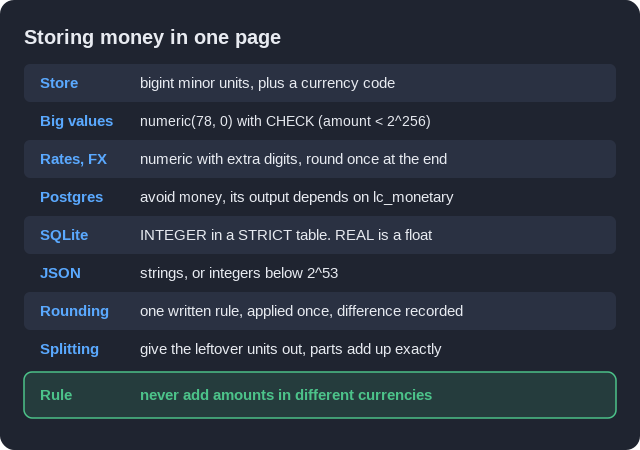
Further reading
- PostgreSQL docs: numeric types, the money type and mathematical functions
- SQLite docs: datatypes and STRICT tables
- ISO 4217 currency codes and minor units, from SIX, the maintenance agency
- MDN: Number.MAX_SAFE_INTEGER
- RFC 8259, section 6: numbers in JSON
- Stripe docs: currencies and minor units
- Next in this series: a double-entry ledger in Postgres, then payment reconciliation
- On this site: idempotency keys, for retrying a payment request without charging twice

Backend engineer who builds high-volume systems that move money. More about Rafi