You did what the guides say. PRAGMA journal_mode=WAL. PRAGMA busy_timeout=5000.
The app still logs database is locked, and the timestamps show the failure
took a few milliseconds. Not five seconds.
That detail is the clue. A timeout that never waits is not broken. SQLite did not ask it to wait, because waiting could not have worked.
The general rules of SQLite locking are in SQLite locking: why you get “database is locked”. This post is about one case in WAL mode: what the snapshot rule is, how to tell the two error codes apart, and the setting that fixes it in each common driver.
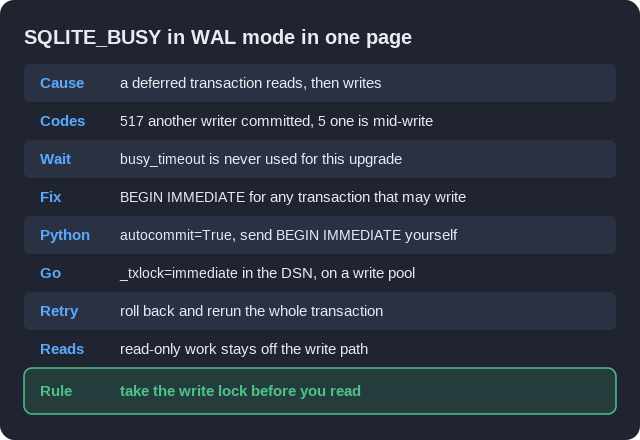
Short version:
- In WAL mode a transaction that starts with a read works on a fixed snapshot.
If it then writes after another connection committed, SQLite returns
SQLITE_BUSY_SNAPSHOT(517) at once.busy_timeoutis not used. - Take the write lock first. Start every transaction that may write with
BEGIN IMMEDIATE. Then any waiting happens atBEGIN, where the timeout works. - Drivers often hide the
BEGIN. Python’sisolation_level="IMMEDIATE"andautocommit=Falsedo not fix this. Go needs_txlock=immediatein the DSN.
What you see in the logs
The message is the same for every kind of busy error: database is locked.
The result code is not. SQLite has a primary code and, below it, extended codes
that say more. The primary code is the low 8 bits of the extended one, so
517 is a kind of 5.
| Code | Name | What it means in WAL mode |
|---|---|---|
| 5 | SQLITE_BUSY | Another connection holds, or is taking, the write lock |
| 517 | SQLITE_BUSY_SNAPSHOT | You tried to write, but another connection wrote after your read began |
| 261 | SQLITE_BUSY_RECOVERY | Another process is recovering the database after a crash |
Log the code, not only the message. In Python 3.11 and later the exception has
sqlite_errorcode and sqlite_errorname. In Go’s mattn/go-sqlite3, the
sqlite3.Error value has an ExtendedCode field, and sqlite3.ErrBusySnapshot
is the constant to compare it with. In modernc.org/sqlite, the error has a
Code() method, and it returned 517 in my test below.
try:
    con.execute("UPDATE counter SET n = ?", (n + 1,))   # after a SELECT in the same transaction
except sqlite3.OperationalError as e:
    print(e.sqlite_errorcode, e.sqlite_errorname)   # 517 SQLITE_BUSY_SNAPSHOT
If you see 517, this post is your answer. If you see plain 5 after seconds, you have a slow writer, and the checklist in the locking post fits better.
Why busy_timeout is not used
In WAL mode, writers append to the -wal file and readers keep working. The
WAL docs say how a reader stays consistent:
each reader has an end mark in the WAL that does not change for the duration
of its transaction, so it sees the database as it was at one point in time.
That is a snapshot. It is the reason readers never block the writer. It is also the reason a reader cannot just start writing later.
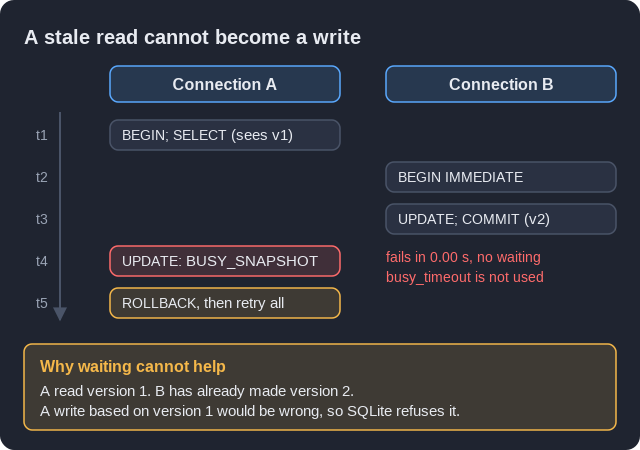
The result code docs describe the same
scenario. SQLITE_BUSY_SNAPSHOT happens when a connection tries to promote a
read transaction into a write transaction but finds that another connection
has already written, so its earlier reads are out of date.
Think about what a wait would do. A is holding version 1. Even if it waited for B to finish, nothing would change: version 1 is still old. The only way forward is to throw the transaction away and start again on version 2. So SQLite does not call the busy handler. It returns the error.
I ran five variants in WAL mode with a 5000 ms timeout. Connection B held the write lock, or had just committed, and connection A tried to write:
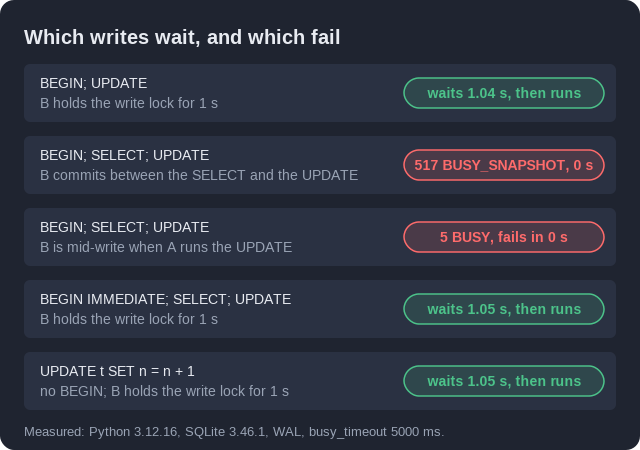
Three details from that run:
- The first statement decides.
BEGINfollowed by a write waits and then runs. The docs say a deferred transaction whose first statement is a write starts as a write transaction. Only a read first creates a snapshot. - Plain 5 also fails at once. If B is in the middle of writing when A’s
upgrade is attempted, A gets
SQLITE_BUSY, not 517, and still no wait. The docs on BEGIN list both cases: another connection “has already modified the database or is already in the process of modifying the database”. - Reading another table does not help. A read
other, B wrotecounter, A wroteother. Still 517. The snapshot is of the whole database, not of a table.
In rollback-journal mode the same refusal exists for a different reason. The
sqlite3_busy_handler docs
explain the deadlock rule behind it, and the locking post walks through it.
The fix: take the write lock first
BEGIN IMMEDIATE;
SELECT n FROM counter WHERE id = 1;
UPDATE counter SET n = n + 1 WHERE id = 1;
COMMIT;
BEGIN IMMEDIATE starts a write transaction at once. If another writer is
active, it waits there, inside the busy handler, and the timeout counts. The
result code docs add a promise: if
BEGIN IMMEDIATE succeeds, no later operation up to the COMMIT returns
SQLITE_BUSY.
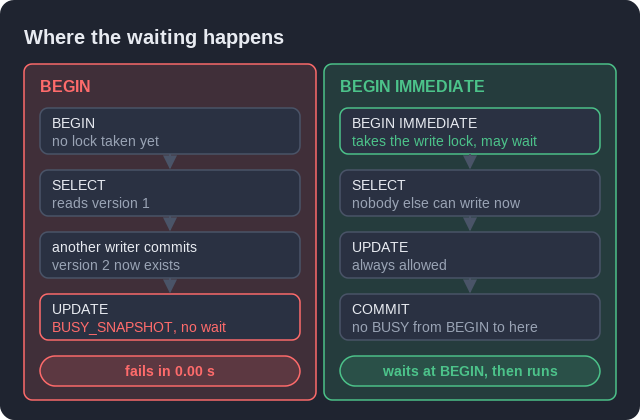
You are not adding a bottleneck. WAL has one writer at a time anyway. The difference is that the queue forms at the door, before any work is done, not in the middle of a transaction that has to be thrown away.
The test
I wrote a small test to see the size of the difference. Eight threads, each with
its own connection, each doing 100 loops of “read the counter, add one, write it
back”. WAL mode, busy_timeout 5000 ms, one run for each BEGIN kind. A failed
transaction was rolled back and not retried.
def worker(begin):                     # begin is "BEGIN" or "BEGIN IMMEDIATE"
    con = sqlite3.connect("t.db", timeout=5, isolation_level=None)
    for _ in range(100):
        try:
            con.execute(begin)
            n = con.execute("SELECT n FROM counter").fetchone()[0]
            con.execute("UPDATE counter SET n = ?", (n + 1,))
            con.execute("COMMIT")
        except sqlite3.OperationalError as e:
            if con.in_transaction:
                con.execute("ROLLBACK")
            errors[e.sqlite_errorname] += 1
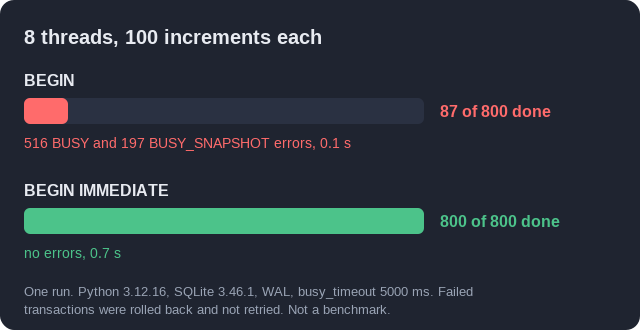
This is one run on one machine (Python 3.12.16, SQLite 3.46.1 in a Linux
container). Do not read the times as a benchmark. The counts are the point:
the plain BEGIN run lost most of its work to errors that never waited, and
the BEGIN IMMEDIATE run lost none. Both error codes showed up in the plain
BEGIN run, which is what the table above predicts.
Your driver may hide the BEGIN
The SQL is easy. The hard part is getting your driver to send it, at the right
time. A driver that sends BEGIN IMMEDIATE after your SELECT has not helped
you at all.
Python
Python’s sqlite3 has three ways to run, and only the last one is safe for a
read-then-write.
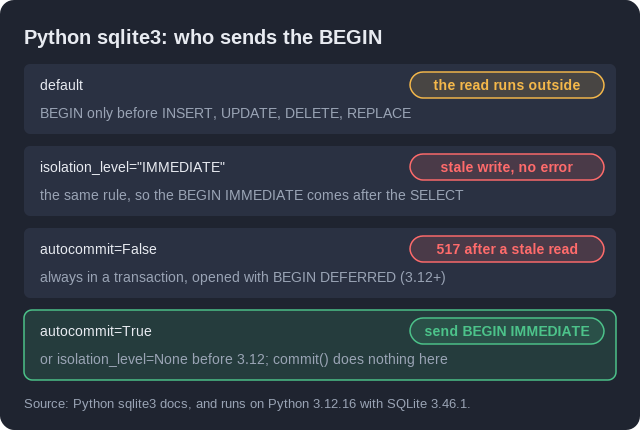
The docs say that in the
legacy mode, isolation_level only affects statements that write: a
transaction is opened implicitly before INSERT, UPDATE, DELETE or
REPLACE, and for other statements nothing is done. So with
isolation_level="IMMEDIATE", your SELECT runs outside any transaction.
I checked: in_transaction was False after the SELECT. Another connection
added 1 to the counter, then my code wrote the value it had read plus one.
Expected 2, got 1. No error at all. That is worse than SQLITE_BUSY.
With autocommit=False (Python 3.12 and later), the docs say sqlite3 always
keeps a transaction open and uses BEGIN DEFERRED to open it. That is the
read-then-write trap, and in my test it gave 517.
The mode that works is the one where Python stays out of the way: autocommit=True
in 3.12 and later, or isolation_level=None in any version. You send the
statements yourself. In autocommit=True, commit() does nothing, so run
COMMIT as SQL.
import sqlite3
from contextlib import contextmanager

con = sqlite3.connect("app.db", timeout=5, autocommit=True)   # 3.12+
# before 3.12: sqlite3.connect("app.db", timeout=5, isolation_level=None)
con.execute("PRAGMA journal_mode=WAL")

@contextmanager
def write_tx(con):
    con.execute("BEGIN IMMEDIATE")      # waits here, up to the timeout
    try:
        yield con
    except BaseException:
        con.execute("ROLLBACK")
        raise
    con.execute("COMMIT")

with write_tx(con):
    n = con.execute("SELECT n FROM counter WHERE id = 1").fetchone()[0]
    con.execute("UPDATE counter SET n = ? WHERE id = 1", (n + 1,))
Django
Django 5.1 added a transaction_mode option for SQLite. Set it in OPTIONS:
DATABASES = {
    "default": {
        "ENGINE": "django.db.backends.sqlite3",
        "NAME": BASE_DIR / "db.sqlite3",
        "OPTIONS": {
            "transaction_mode": "IMMEDIATE",
            "timeout": 20,
        },
    }
}
The Django docs
say that to make transactions wait until the timeout before raising “database
is locked”, you change the mode to IMMEDIATE. The timeout option is how
long that wait lasts.
Go
Both common drivers take the mode in the connection string. They then send
that BEGIN for every db.Begin() on the connection. In mattn/go-sqlite3
the source
reads _txlock and sets the statement to BEGIN IMMEDIATE, BEGIN EXCLUSIVE
or plain BEGIN. The busy timeout in that driver is 5000 ms unless you set
_busy_timeout. In modernc.org/sqlite
_txlock is documented as “deferred” by default, and you set the timeout
with a pragma.
// mattn/go-sqlite3
dsn := "file:app.db?_journal_mode=WAL&_busy_timeout=5000&_txlock=immediate"

// modernc.org/sqlite
dsn := "file:app.db?_pragma=journal_mode(WAL)&_pragma=busy_timeout(5000)&_txlock=immediate"
Because every transaction on that handle now takes the write lock, I split the handle in two. One for writes, one for reads:
writeDB, _ := sql.Open("sqlite3",
    "file:app.db?_journal_mode=WAL&_busy_timeout=5000&_txlock=immediate")
writeDB.SetMaxOpenConns(1) // one writer connection, Go queues the callers

readDB, _ := sql.Open("sqlite3", "file:app.db?_busy_timeout=5000")
I ran the same story with both drivers: transaction A reads, transaction B
commits a write, then A writes. With the default BEGIN, A failed at once with
database is locked in both drivers (517 in modernc). With
_txlock=immediate, B waited for A’s lock instead, A’s write went through,
and both increments were kept.
WAL mode is stored in the database file, so the read handle does not need to
set it again. The go-sqlite3 README also suggests SetMaxOpenConns(1) in its
“database is locked” FAQ. With one writer connection, Go’s pool does the
queuing, and SQLite’s busy handler is only the second line of defence.
Node, Rust and plain SQL
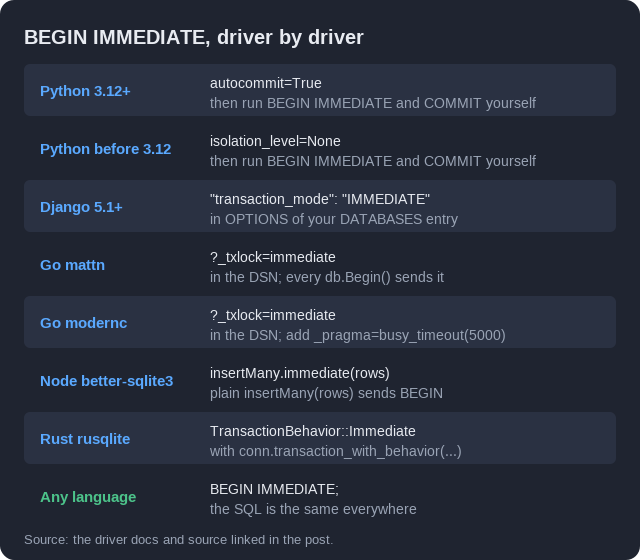
In better-sqlite3, a transaction function made with db.transaction(fn) has
.deferred, .immediate and .exclusive variants, and the
docs
show that the plain call uses BEGIN. Call fn.immediate(args). The
constructor’s timeout option defaults to 5000 ms.
In Rust’s rusqlite,
conn.transaction() is deferred. Use
conn.transaction_with_behavior(TransactionBehavior::Immediate), or call
set_transaction_behavior once on the connection.
If your library has no setting, run BEGIN IMMEDIATE yourself as the first
statement. The SQL is the same everywhere.
When BEGIN IMMEDIATE is not enough
It can still time out. BEGIN IMMEDIATE waits, but only as long as
busy_timeout. If another writer holds the lock for longer, you get plain
SQLITE_BUSY at the BEGIN. That is a good place to fail: nothing has been
done yet. Retry the whole transaction, not one statement. A short helper:
import time

def run_write(con, fn, tries=3):
    for attempt in range(tries):
        try:
            with write_tx(con):
                return fn(con)
        except sqlite3.OperationalError as e:
            is_busy = e.sqlite_errorcode & 0xFF == 5     # primary code 5
            if not is_busy or attempt == tries - 1:
                raise
            time.sleep(0.05 * (attempt + 1))
I ran it against a connection that held the lock past a 200 ms timeout. It
retried twice, gave up on the third try and raised database is locked.
That is what you want: a clear error, after a bounded wait.
The lock lasts as long as the transaction. A BEGIN IMMEDIATE that calls
an HTTP API holds every other writer out while it waits. Do slow work before
BEGIN and keep only the read, the write and the commit inside. The long
transaction and checkpoint problems are in
the locking post.
Read-only work should not take the write lock. A transaction that only
reads can stay deferred. In WAL mode readers do not block the writer, and the
writer does not block them, apart from the rare cases the
WAL docs list. A Go handle opened with
_txlock=immediate makes every transaction a writer, which is why I use
a separate read handle.
Often you do not need the transaction at all. A single statement is
atomic by itself. This runs without a BEGIN, and when I ran it with another
connection holding the write lock, it waited 1.05 s and succeeded:
UPDATE counter SET n = n + 1 WHERE id = 1;
If the “read” in your read-then-write is only there to compute the new value, try to move the arithmetic into the statement. Then there is no snapshot to go stale. My other defaults for a busy SQLite file are in SQLite for high-traffic websites.
Which option should you use?
| Your transaction | Start it with | Why |
|---|---|---|
| Reads, then maybe writes | BEGIN IMMEDIATE | The write lock is taken before the snapshot |
| Only writes | BEGIN or BEGIN IMMEDIATE | A first-statement write already waits; IMMEDIATE says so |
| Only reads | BEGIN or no transaction | No write lock needed |
| One statement that does its own arithmetic | No BEGIN | One statement is atomic, and it waits for the lock |
| Several statements that must agree | BEGIN IMMEDIATE | One snapshot, one writer, no stale reads |
Questions people ask
Why does busy_timeout not work in WAL mode?
It does work, for the cases where waiting can help: BEGIN IMMEDIATE, a
transaction whose first statement is a write, a lone UPDATE. It does not
apply when a transaction that already read tries to become a writer after
another connection has written. That returns SQLITE_BUSY_SNAPSHOT at once,
because the old snapshot cannot be used for a write.
Does WAL mode allow more than one writer? No. The WAL docs say there is one WAL file, so there can only be one writer at a time. WAL lets readers and that one writer work together. It does not let two writers work together.
Should every transaction use BEGIN IMMEDIATE? Every transaction that might write, yes. A transaction that only reads does not need it, and giving it the write lock makes it queue behind real writers for no reason.
Is SQLITE_BUSY_SNAPSHOT a bug in my code or in SQLite? Neither. It is SQLite refusing a write that would sit on stale reads. The fix is in how the transaction starts. If you cannot change the start, the fallback is a retry of the whole transaction, which re-reads on a fresh snapshot.
Django says “database is locked” even with a long timeout. What now?
Set "transaction_mode": "IMMEDIATE" in OPTIONS (Django 5.1 and later). A
longer timeout only helps when the wait can be served, and the Django docs
say raising it does not solve the cause by itself.
Cheat sheet
Further reading
- SQLite docs: result codes, SQLITE_BUSY and SQLITE_BUSY_SNAPSHOT
- SQLite docs: BEGIN, COMMIT and ROLLBACK
- SQLite docs: write-ahead logging
- SQLite docs: sqlite3_busy_handler()
- Python docs: sqlite3, transaction control
- Django docs: SQLite notes, transaction behavior
- mattn/go-sqlite3 source and modernc.org/sqlite docs
- better-sqlite3 API and rusqlite Connection
- SQLite locking: why you get “database is locked” on this site
- SQLite for high-traffic websites on this site
- Understanding PostgreSQL locks on this site

Backend engineer who builds high-volume systems that move money. More about Rafi