You scale the web tier from 4 instances to 12 because traffic is up. Ten minutes later the logs fill with one line, and half the requests fail:
FATAL: sorry, too many clients already
The database is not busy. CPU is low. Nothing is slow. It just refuses to
talk to anyone new. The quick fix people reach for is max_connections = 500.
That moves the wall, and the next outage is worse, because it is slower and
harder to read.
This post is about finding out who is holding the connections, doing the arithmetic that tells you how many you should have, and putting a pooler in front when the arithmetic does not work.
Short version:
- Every client connection is one backend process and one slot. When all slots
are taken, PostgreSQL refuses new ones. Count who holds them with
pg_stat_activitybefore you change anything. - Total connections are
instances x pool size, plus workers, cron jobs and you. Do that sum for every service. Most of the time the sum is the bug. - A pooler such as PgBouncer in transaction mode lets many clients share a few
server connections. It breaks session state:
SET, session advisory locks,LISTEN, SQL-levelPREPARE. Check each one before you switch.
What the error means
PostgreSQL has a fixed number of connection slots. max_connections sets it,
and the default is typically 100. A new client takes a free slot. If none is
free, the server answers with this error and hangs up. The SQLSTATE is
53300
(too_many_connections).
You can see the exact string in the server source: it is raised in
proc.c when no process slot is left. The server also keeps back a few slots
for administrators. superuser_reserved_connections defaults to 3. Once the
free slots drop to that number, only superusers get in. That gives you a second
message, and in practice it is the one your app sees first:
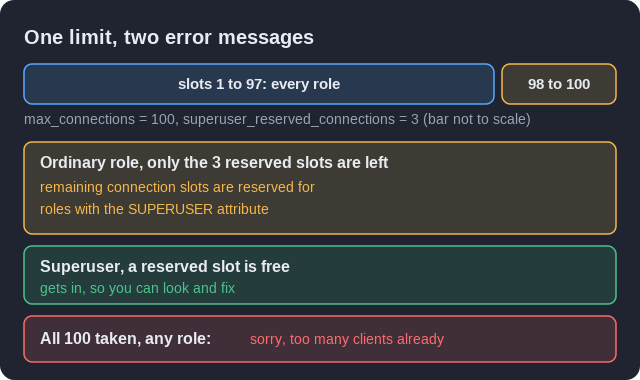
I ran this on PostgreSQL 17 in Docker with max_connections = 6 and the
default reservation of 3. The fourth ordinary connection was refused with:
FATAL: remaining connection slots are reserved for roles with the SUPERUSER attribute
Then I set superuser_reserved_connections = 0 and max_connections = 5 and
filled all five slots. Now even psql -U postgres got sorry, too many clients already. That is the lesson of the reservation: it is what lets you log in
during the outage. Leave it alone. The wording changed between versions
(PostgreSQL 15 says “reserved for non-replication superuser connections”), and
PostgreSQL 16 added reserved_connections for a role that is allowed to use the
reserve. The meaning is the same.
What counts against max_connections? Client sessions. In the current source,
autovacuum workers, background workers (this includes parallel query workers)
and WAL senders take slots from their own pools, set by
autovacuum_max_workers, max_worker_processes and max_wal_senders. So
max_connections is, for practical purposes, “how many clients can be
connected at once”. That includes idle ones, and it includes connections from a
pooler.
Why raising max_connections is the wrong first fix
It is the right fix sometimes, so here is why it is a bad first one.
- It needs a restart. The docs say it “can only be set at server start”. You cannot do it in the middle of the outage without a brief outage of your own.
- A standby must match. The docs say a standby must be set to the same or a higher value than the primary, or queries are not allowed on the standby.
- Each connection is a process. The docs describe a “process per user” model: every client connects to exactly one backend process, and the postmaster spawns a new one for each request. A thousand connections is a thousand processes.
- Memory is per operation, not per connection.
work_mem(4MB by default) is a limit for one sort or hash step. The docs warn that a complex query can run several of them at once, and several sessions can do it at the same time, so “the total memory used could be many times the value ofwork_mem”. More slots means a higher worst case. - More active connections can mean less work done. The PostgreSQL wiki page
on the number of database connections
says that past a point throughput “starts to fall off due to the overhead
from that contention”. It lists lock contention, context switching, and
internal structures that scale badly as
max_connectionsgrows.
The error is a signal that you have more clients than the database can serve well. A bigger limit turns a loud, fast failure into a slow one: queries pile up, latency climbs, and people blame the queries.
I raise it in one case: the pool math below is correct, the host has memory to
spare, and the number of connections doing work is low. The wiki’s own
advice is that max_connections should be “a bit bigger” than the total of
your pools. That is a small bump, not 5x.
Count who holds the slots
Connect as a superuser (the reserved slots are for this) and run this. It counts only client sessions, so background processes do not distort it:
SELECT count(*) AS clients,
       current_setting('max_connections')::int AS max_connections,
       current_setting('superuser_reserved_connections')::int AS reserved
FROM pg_stat_activity
WHERE backend_type = 'client backend';
Then group them by who and what state. The state tells you the story: active
means running a query, idle means waiting for the client’s next command, and
idle in transaction means a transaction is open and nothing is running.
SELECT usename, application_name, state,
       count(*) AS n,
       max(now() - state_change) AS longest_in_state
FROM pg_stat_activity
WHERE backend_type = 'client backend'
GROUP BY usename, application_name, state
ORDER BY n DESC;
This is real output from my test server. Two sessions were running a query and two belonged to a role that opened a transaction and walked away:
 usename  | application_name |        state        | n | longest_in_state
----------+------------------+---------------------+---+------------------
 app      | psql             | active              | 2 | 00:00:23.413699
 batch    | nightly-batch    | idle in transaction | 2 | 00:00:23.353949
 postgres | psql             | active              | 1 | -00:00:00.000001
application_name is only useful if your services set it. Most drivers accept
it in the connection string (application_name=checkout-api). Set it today.
It costs nothing and turns this table from a guess into an answer.
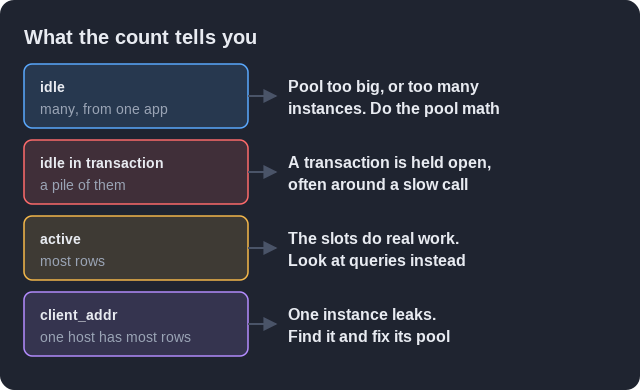
What each pattern usually means:
- Mostly
idle, from one application. The pool is bigger than the work needs, or there are more instances than you thought. This is the common case. - Mostly
active. The slots are doing real work. Pooling will not make the queries cheaper. Look at slow queries and at how many requests run at the same time. - A pile of
idle in transaction. Code opened a transaction and is waiting on something else, usually a network call. These also hold locks. The locks post shows how that turns into an outage of its own. - One
client_addrwith far more rows than the others. One instance is leaking connections. Group byclient_addrto find it.
Free slots now
To get out of the incident, end the sessions that are doing nothing. Start with
the oldest idle in transaction ones from a role you can name:
SELECT pg_terminate_backend(pid)
FROM pg_stat_activity
WHERE backend_type = 'client backend'
  AND state = 'idle in transaction'
  AND usename = 'batch'
  AND now() - state_change > interval '5 minutes';
pg_terminate_backend ends the session and rolls back its open transaction.
A non-superuser can do it only for a backend of a role they are a member of, or
with pg_signal_backend, and only a superuser can end a superuser’s backend.
Without a timeout argument it returns true once the signal is sent, even if
the process is still shutting down.
An idle session in a pool is usually fine to kill: the pool notices and
opens a new one. The app may log one error. If the pool is the reason you are
full, it will take the slot back, so this only buys you minutes. That is
enough time to fix the real cause.
Do the pool math
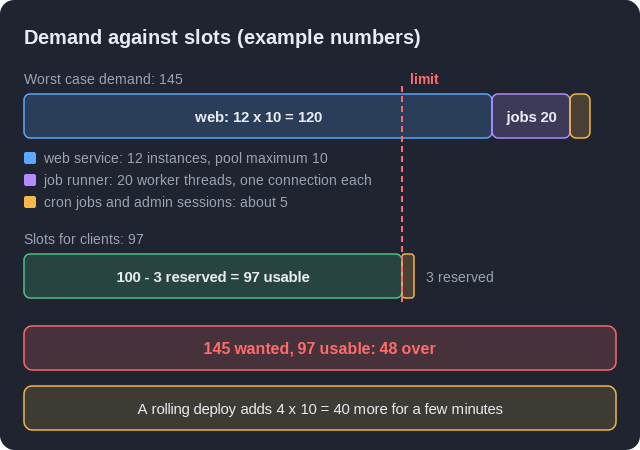
Each application instance has its own pool, and each pool has its own maximum. The slots needed in the worst case are:
instances x pool_max   (for every service)
+ background workers and cron jobs
+ migrations, dashboards, you with psql
must be less than  max_connections - superuser_reserved_connections
Here is an example with made-up numbers. The service has 12 instances and a pool maximum of 10, a common driver default:
12 instances x 10 = 120 connections wanted
100 max_connections - 3 reserved = 97 usable
That is 23 slots short the first time every pool fills, even on a quiet day. Three things push the peak higher:
- A rolling deploy runs old and new instances together. For a few minutes you have more instances than your steady count. A deploy that adds 4 new instances before it removes 4 old ones needs room for 16 pools.
- Autoscaling and serverless multiply the pools. Every function instance or pod that starts opens its own pool. The database sees the peak, not the average.
- Workers count too. A job runner with 20 threads, each holding a connection while it waits on a queue, is a 20-slot service.
So what pool size is right? The PostgreSQL wiki gives a starting point for the number of connections with active transactions:
(core_count * 2) + effective_spindle_count. It says core count should not
include hyperthreads, effective spindle count is 0 when the active data set is
fully cached, and the formula is a start for you to tune on your own system,
not a final answer. On a database with 8 cores and a hot data set, that is
about 16 active connections. A pool of 10 per instance across 12 instances is
120 slots for work that fits in about 16.
What I change, in order:
Set a pool maximum on purpose. Do not leave the driver default. Divide the usable slots by the instances you will have at peak (with the rolling deploy surge), and leave room for workers.
Cap each service with a role limit. One leaking service should not be able to take every slot:
ALTER ROLE checkout_api CONNECTION LIMIT 30;Only normal connections count. The docs say the limit is never enforced for superusers, and it is approximate when two sessions start at the same moment. I confirmed the message: a second session for a role limited to 1 got
FATAL: too many connections for role "batch". That error stays inside the one service that overspent, and the rest of the site keeps its slots.ALTER DATABASE ... CONNECTION LIMITdoes the same for a database.Close the idle-in-transaction leak. Set
idle_in_transaction_session_timeouton the app role so a forgotten transaction is cut instead of holding a slot (and locks) for hours. Role settings apply at login, so they reach new sessions only.Keep slow work out of the transaction. Calling another service between
BEGINandCOMMITkeeps the slot busy for as long as that call takes. Write an event row in the transaction and send it later, as in the transactional outbox post.Check long-lived workers. A queue worker that takes a connection and holds it while it sleeps is a slot you pay for all day. The job queue post shows a worker loop that takes a connection only for the claim.
When the pools are small and you are still full: a pooler
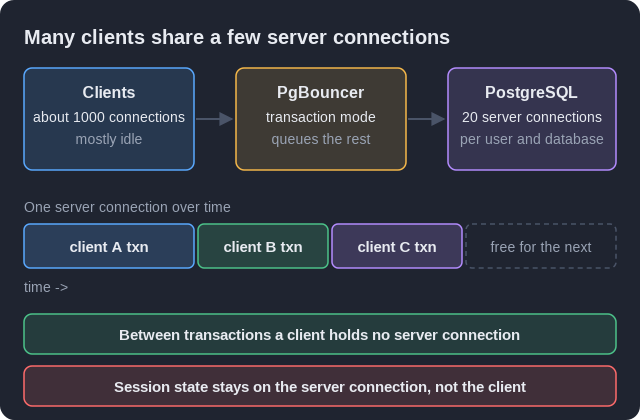
Sometimes the sum is right and you still have too many clients. A fleet of short-lived functions, hundreds of instances, or many small services each with a pool of 2. Now you want a pooler: a proxy that holds a small number of real PostgreSQL connections and shares them among many clients.
PgBouncer is the usual one. It has three pool modes, and the mode is the whole decision:
| Mode | A server connection is yours | Reduces server connections? | Session features |
|---|---|---|---|
session (the default) | until you disconnect | Only when clients disconnect. Idle clients keep theirs | All work |
transaction | only during a transaction | Yes, a lot | Some break |
statement | for one statement, no multi-statement transactions | Yes | Multi-statement transactions fail |
Session mode helps if your clients connect and leave. It does nothing for an
app that keeps 120 pooled connections open. Transaction mode is what people
mean when they say “use PgBouncer”. The client gets a server connection when
it starts a transaction, and gives it back at COMMIT. A thousand clients that
are mostly idle can share 20 server connections.
A starting config. The values are examples, so size them from your own math:
[databases]
app = host=10.0.0.5 port=5432 dbname=app

[pgbouncer]
pool_mode = transaction
default_pool_size = 20
max_client_conn = 1000
max_db_connections = 40
query_wait_timeout = 10
What these do, from the PgBouncer docs:
default_pool_size(default 20) is the number of server connections per user and database pair. Three roles on two databases can open up to six pools. This is the most common surprise.max_db_connectionscaps the total for a database across users, and the default is 0, which means no limit.max_client_conn(default 100) is how many clients may connect to PgBouncer. Raising it can need a higher open-file limit on the host.query_wait_timeout(default 120 seconds) is how long a query may wait for a server connection before the client is disconnected. With the default, a full pool means a two-minute stall.reserve_pool_size(default 0) andreserve_pool_timeout(default 5 seconds) let a pool borrow extra connections when clients wait.
And then the part that does not go in the pooler: PostgreSQL’s
max_connections must still cover every pool, plus anything that connects
directly (migrations, admin, monitoring). Add them up the same way as before.
What breaks in transaction mode
When the server connection changes between transactions, anything that lives in the session is gone or belongs to someone else. This is the feature table from the PgBouncer docs, with the fix for each:
| Feature | In transaction mode | Do this instead |
|---|---|---|
SET / RESET | Never | SET LOCAL inside the transaction, or a role/database default with ALTER ROLE ... SET |
Session-level advisory locks (pg_advisory_lock) | Never | pg_advisory_xact_lock, which ends with the transaction |
LISTEN | Never | A separate direct connection for listeners. NOTIFY works |
PREPARE / DEALLOCATE (SQL level) | Never | Protocol-level prepared statements (below) |
WITH HOLD cursors | Never | A plain cursor inside one transaction |
Temp tables with PRESERVE ROWS or DELETE ROWS | Never | ON COMMIT DROP temp tables work |
LOAD | Never | Use shared_preload_libraries or session_preload_libraries |
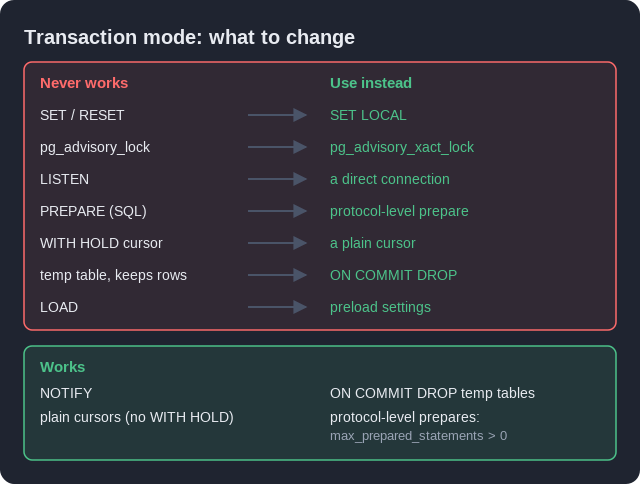
Three of these are worth a longer look.
Prepared statements. Most drivers use protocol-level prepared statements
without being asked, which is why this breaks people first. PgBouncer 1.21.0
(October 2023) added support, and it is off unless max_prepared_statements is
non-zero. Since 1.24.0 (January 2025) the default is 200. On an older PgBouncer
you must turn prepared statements off in the driver, or you get errors about prepared statements that cannot be found. Check SHOW VERSION; in the PgBouncer
console. SQL-level PREPARE is still “Never”.
SET leaks. PgBouncer’s server_reset_query (default DISCARD ALL) is
used only in session mode, unless server_reset_query_always is on. So in
transaction mode nothing wipes the session between clients. A SET statement_timeout
or SET search_path that “seems to work” can stay on a server connection and
apply to the next client’s queries. Use SET LOCAL, which lasts until the end
of the current transaction.
Advisory locks. A job runner that takes pg_advisory_lock(42) to be the
only copy running will lose the lock when its next statement lands on a
different server connection, and the lock stays held by a connection that
somebody else is now using. Use the transaction-level lock, or keep that one
process on a direct connection.
Migrations and pg_dump should also go direct, not through the pooler. They
often use session state.
When it breaks
- The failure gets quiet. PostgreSQL refuses fast. PgBouncer queues. If the
pool is too small, requests wait up to
query_wait_timeoutinstead of failing, and the symptom becomes “the site is slow”. Watchcl_waitingandmaxwaitfromSHOW POOLS;in the PgBouncer admin console (connect to the database namedpgbouncer). The docs say that ifmaxwaitkeeps rising, the pool “does not handle requests quickly enough”. - An open transaction pins a server connection. In transaction mode, a
client that runs
BEGINand then calls a slow API holds a server connection the whole time. The leak does not go away. It moves, and it now starves every other client. Timeouts and short transactions still matter. - Two limits, not one. Clients can be refused by PgBouncer at
max_client_connand by PostgreSQL atmax_connections. Know which one you hit before you change either. - The app pool and the pooler stack. With PgBouncer you can shrink the application pools. A pool of 10 per instance against PgBouncer costs PgBouncer client connections, not PostgreSQL slots.
Which fix should you use?
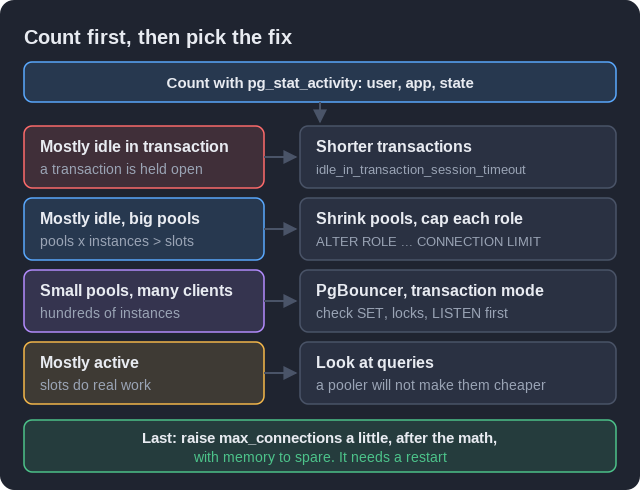
| Smaller pools + role limits | PgBouncer (transaction) | Raise max_connections | |
|---|---|---|---|
| Good for | Almost every case. No new part to run | Hundreds of clients, serverless, short-lived instances | The sum is right and there is memory |
| Watch out for | You must do the arithmetic and keep it up to date | SET, session locks, LISTEN, old prepared statement support | Restart, standby setting, memory, slower under load |
| Cost | A config change | A new service to run and monitor | A restart |
Questions people ask
What is the default max_connections in PostgreSQL?
Typically 100, but the docs say it may be lower if the kernel settings cannot
support it, as determined during initdb. Three of them are held back by
superuser_reserved_connections, so an ordinary role gets 97 with the defaults.
Check yours with SHOW max_connections;.
Do idle connections count against max_connections?
Yes. A connection that runs no query still has a backend process and a slot.
That is why a pool that is mostly idle can still fill the server. The
state column in pg_stat_activity tells you which sessions are idle.
Can I change max_connections without a restart?
No. The docs say it can only be set at server start. You can lower the
pressure at once with pg_terminate_backend on idle sessions and
ALTER ROLE ... CONNECTION LIMIT on the role that overspends, since those
need no restart.
Is PgBouncer transaction mode safe for my app?
It is safe when the app uses no session state between transactions. Go through
the table above: SET, session advisory locks, LISTEN, SQL-level PREPARE,
WITH HOLD cursors. Run your tests against PgBouncer before production.
Prepared statements need PgBouncer 1.21 or newer, with max_prepared_statements
set (it defaults to 200 from 1.24).
Why do I see “remaining connection slots are reserved” and not “too many clients”? You are an ordinary role and only the reserved slots are left. The reserve exists so a superuser can still log in and fix things. “Too many clients” is what you get when every slot is taken, including the reserved ones.
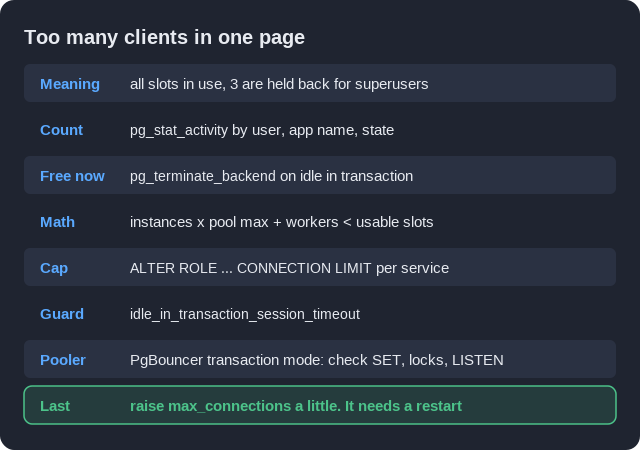
Cheat sheet
Further reading
- PostgreSQL docs: connections and authentication (max_connections, superuser_reserved_connections)
- PostgreSQL docs: monitoring statistics (the pg_stat_activity view)
- PostgreSQL docs: server signaling functions (pg_cancel_backend, pg_terminate_backend)
- PostgreSQL docs: CREATE ROLE, the CONNECTION LIMIT option
- PostgreSQL wiki: number of database connections
- PgBouncer features: pool modes and the feature table
- PgBouncer configuration reference
- PgBouncer changelog
- PostgreSQL locks explained: find and fix blocking queries on this site, for
idle in transactionandlock_timeout - The transactional outbox pattern on this site, for keeping slow calls out of a transaction
- Postgres as a job queue with SKIP LOCKED on this site

Backend engineer who builds high-volume systems that move money. More about Rafi