An endpoint has inserted orders for a year without a problem. Then the log starts to fill with this:
ERROR:  duplicate key value violates unique constraint "orders_pkey"
DETAIL:  Key (id)=(42) already exists.
Row 42 is there. Maybe nobody meant to insert 42. Maybe somebody did, twice. The message is the same either way, and the usual advice online is one fix for all of it. It is not one bug. Three different problems print this exact text, and the fix for one does nothing for the others.
Short version:
- Read the message first. The constraint name tells you the table and the
Key (...)line tells you the value. Then ask who made that value: the database counter, or your app. - Two requests at the same time: use
INSERT ... ON CONFLICT. A stale sequence: move it withsetval. A retry of a request that already worked: make the insert idempotent and read the old row back. - Do not catch the error and call it success until you know which of the three it is. That hides the other two.
Read the message first
Here is what each part of the message tells you. I ran every example in this post on PostgreSQL 17.
ERROR:  duplicate key value violates unique constraint "orders_pkey"
DETAIL:  Key (id)=(42) already exists.
"orders_pkey"is the constraint (and the unique index behind it) that refused the row. In my runs a primary key got the name<table>_pkey, and a unique column got<table>_<column>_key, so the table is right there in the name.Key (id)=(42)is the column and the value that collided. For a composite key you see all the columns, likeKey (user_id, day)=(7, 2026-01-02).- The error code is
23505, namedunique_violationin the PostgreSQL error code list. Your driver gives you this code, so you can catch this error without parsing text.
The database is telling you that a row with this key already exists, or that another transaction is busy inserting one. It does not tell you why. To find out, look at the row and ask where the value came from:
SELECT * FROM orders WHERE id = 42;
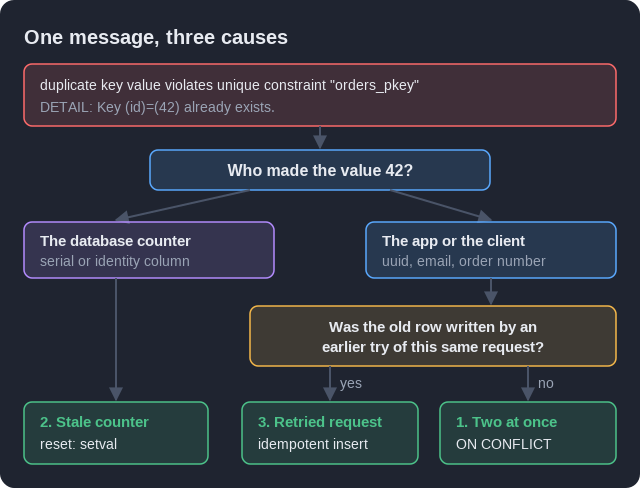
The rest of the post takes the three causes in turn: first the race, because
ON CONFLICT also solves the third one, then the sequence, then the retry.
Cause 1: two requests at the same time
This is the one people meet first. The code looks safe:
cart = db.query("SELECT * FROM carts WHERE user_id = %s", user_id)
if cart is None:
    db.execute("INSERT INTO carts (user_id) VALUES (%s)", user_id)
Check, then insert. It works in every test, because a test sends one request. In production a user double-clicks, or two tabs load, and two requests run this code together:
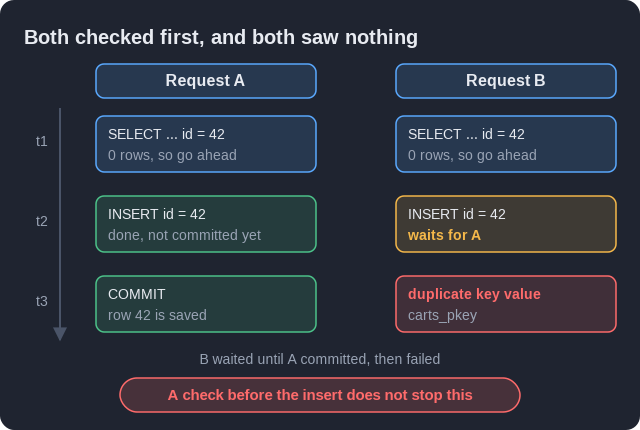
I reproduced it with two psql sessions. Both ran in a transaction, both
selected user_id = 42 and got 0 rows, and then both inserted. The second
insert did not fail at once. It waited for the first transaction to finish
(this is a row-level wait, the kind the
locks post describes), and when the
first one committed it failed:
ERROR:  duplicate key value violates unique constraint "carts_pkey"
DETAIL:  Key (user_id)=(42) already exists.
A transaction does not help here. The SELECT cannot see a row that nobody has
committed yet, so no amount of checking first closes the gap. The only place
that can decide is the unique index, and ON CONFLICT lets you tell it what to
do instead of raising an error.
The fix: ON CONFLICT
-- "Create it if it is not there"
INSERT INTO carts (user_id) VALUES (42)
ON CONFLICT (user_id) DO NOTHING;

-- "Create it, or add to the one that is there"
INSERT INTO carts (user_id, items) VALUES (42, 1)
ON CONFLICT (user_id) DO UPDATE SET items = carts.items + EXCLUDED.items;
EXCLUDED is the row you tried to insert. carts is the row that was already
there. From the INSERT docs:
DO NOTHINGskips the row.DO UPDATEupdates the existing row, and “guarantees an atomic INSERT or UPDATE outcome”, even under high concurrency.DO UPDATEneeds a conflict target (the column or columns).DO NOTHINGcan leave it out, and then it handles a conflict on any unique constraint. I name the target anyway. Without it, a duplicate on some other unique column is skipped without a word, and you may not want that.
Pick DO NOTHING when the first writer wins and later ones can be ignored.
Pick DO UPDATE when the later request has something to add or change.
What RETURNING gives back
This is where people get stuck. You wrote RETURNING id so you could use the
id, and now it is empty:
INSERT INTO carts (user_id) VALUES (42)
ON CONFLICT (user_id) DO NOTHING
RETURNING user_id;
-- first time: 1 row
-- row already there: 0 rows
The docs say that only rows that were actually inserted or updated are returned. A skipped row is not. So when you need the row either way, you have two options that work:
-- Option A: make the conflict an update that changes nothing, so the row comes back
INSERT INTO carts (user_id) VALUES (42)
ON CONFLICT (user_id) DO UPDATE SET user_id = EXCLUDED.user_id
RETURNING *;

-- Option B: two statements
INSERT INTO carts (user_id) VALUES (42) ON CONFLICT (user_id) DO NOTHING;
SELECT * FROM carts WHERE user_id = 42;
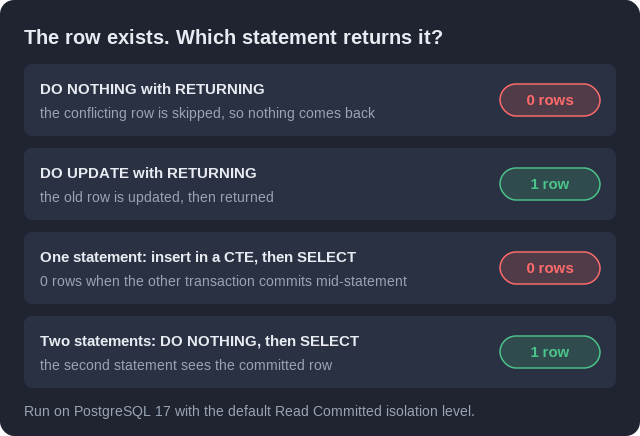
Option A locks and updates the row even though nothing changes, so use it when you want the row and can live with that. Option B costs a second round trip.
Do not try to fold option B into one statement. This looks clever and fails:
WITH ins AS (
  INSERT INTO carts (user_id) VALUES (42)
  ON CONFLICT (user_id) DO NOTHING
  RETURNING *
)
SELECT * FROM ins
UNION ALL
SELECT * FROM carts WHERE user_id = 42;
I ran this while another session had inserted row 42 and not yet committed.
The insert waited, then skipped the row once the other session committed. The
statement returned 0 rows, and the row existed. Both halves of the statement
use the snapshot from before the commit, so neither can see the row. The
Read Committed docs
describe the cause: DO NOTHING may skip a row “due to the outcome of another
transaction whose effects are not visible to the INSERT snapshot”. A separate
SELECT gets a fresh snapshot, so it finds the row.
PostgreSQL 19 note. Version 19 (released 19 November 2026) adds a third
conflict action, ON CONFLICT DO SELECT. It returns the existing row from
RETURNING, so it is the one-statement answer to the problem above:
INSERT INTO carts (user_id) VALUES (42)
ON CONFLICT (user_id) DO SELECT
RETURNING *;
It needs a conflict target and a RETURNING clause (I got an error for each
one that was missing). I ran it on PostgreSQL 19.0 against an uncommitted
insert of the same key from another session. It waited for that session to
commit, then returned the row. You can add FOR UPDATE (or another lock mode)
to lock the row you get back, and a WHERE condition. On 17 and 18, use
option A or B.
Things that bite with ON CONFLICT
- It needs a unique index. With no unique constraint on the target columns
you get
there is no unique or exclusion constraint matching the ON CONFLICT specification.ON CONFLICTcannot replace the constraint. It uses it. - One statement, same key twice. A
DO UPDATEthat proposes two rows with the same key fails withON CONFLICT DO UPDATE command cannot affect row a second time. The docs call the command “deterministic” and say that rows proposed for insertion should not duplicate each other.DO NOTHINGdoes not mind: it inserts the first and skips the second. - It uses up sequence numbers. I inserted the same key three times with
DO NOTHING, then a new key. The ids came out as 1 and 4. The docs say a value fromnextvalis never given back, even when the transaction aborts. Gaps are normal. - Concurrent index builds can break it. While
CREATE INDEX CONCURRENTLYruns on a unique index, the docs for PostgreSQL 17 and 18 warn thatINSERT ... ON CONFLICTon that table “may unexpectedly fail with a unique violation” (see the 17 INSERT page). That sentence is not on the 19 page.
If you cannot use ON CONFLICT (an ORM that does not expose it, or a conflict
you want to handle in code), catch the 23505 and retry the read. One catch
of its own: in Postgres a failed statement aborts the whole transaction. I
tried to carry on after the error and got current transaction is aborted, commands ignored until end of transaction block. Put a SAVEPOINT before the
insert and ROLLBACK TO SAVEPOINT after the error, and the transaction lives
on:
BEGIN;
SAVEPOINT try_insert;
INSERT INTO carts (user_id) VALUES (42);   -- fails with 23505
ROLLBACK TO SAVEPOINT try_insert;          -- the transaction is usable again
SELECT * FROM carts WHERE user_id = 42;
COMMIT;
Cause 2: the sequence is behind the table
Now the other case. Nobody sends a key. The column is serial or an identity
column, the database hands out the id, and the insert still collides:
ERROR:  duplicate key value violates unique constraint "orders_pkey"
DETAIL:  Key (id)=(1) already exists.
A serial or identity column does two separate things. It has a sequence (a
counter) that hands out numbers, and it has a primary key that forbids repeats.
They do not know about each other. If rows get into the table without using
the counter, the counter does not move, and one day it hands out a number that
is already taken.
Ways that happens:
- Rows loaded with explicit ids. A seed script, a CSV import, an
INSERTthat names theidcolumn, or aCOPY. - A copy through logical replication. The PostgreSQL 17 docs say sequence
data is not replicated: the rows arrive, but the sequence on the subscriber
“would still show the start value”. After a switchover to that database, the
first insert collides. The docs say to update the sequences before you do it.
PostgreSQL 19 can replicate sequences
(
CREATE PUBLICATION ... FOR ALL SEQUENCESandALTER SUBSCRIPTION ... REFRESH SEQUENCES, with a publisher on 19 or later; see sequence replication), and the subscriber keeps the last value that was synced. So this cause applies on 18 or earlier, or on 19 when the sequences were not synced since the switchover. - A dump taken without sequence data.
pg_dumpincludes sequence values by default, but not with--schema-onlyor--no-data. Load the rows by hand after that and the counters start from 1.
Identity columns need one more note. GENERATED ALWAYS AS IDENTITY refuses an
explicit id:
ERROR:  cannot insert a non-DEFAULT value into column "id"
DETAIL:  Column "id" is an identity column defined as GENERATED ALWAYS.
HINT:  Use OVERRIDING SYSTEM VALUE to override.
That is a good guard, but OVERRIDING SYSTEM VALUE switches it off, and the
CREATE TABLE docs
say that COPY always uses the values you give it. GENERATED BY DEFAULT
accepts explicit ids with no flag at all. All three can leave the counter
behind.
See how far behind it is
SELECT (SELECT max(id) FROM orders) AS max_id,
       last_value,
       is_called
FROM orders_id_seq;
If last_value is lower than max_id, the next ids will collide. Here is what
that looks like when you keep trying. The table has ids 1 to 5 and a counter
that never moved:
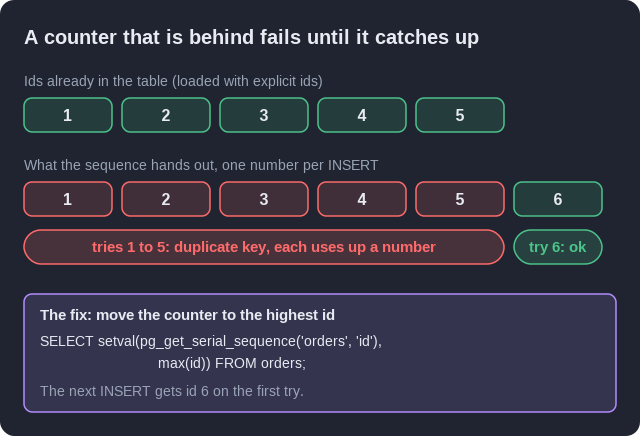
I ran this: five inserts failed with duplicate key value violates unique constraint "orders_pkey", and the sixth worked with id 6. Each failed insert
used up a number, because a sequence is not rolled back. That is why this bug
looks random. It fails for a while, then it works, and the team decides it was
a glitch. It comes back the next time a bulk load runs.
The fix: setval
Move the counter to the highest id in the table:
SELECT setval(pg_get_serial_sequence('orders', 'id'), max(id)) FROM orders;
pg_get_serial_sequence finds the sequence behind the column, so you do not
guess its name. The
docs say it
works for identity columns and for serial columns, and returns NULL when
the column has no sequence. The two-argument setval sets the value so that
“the next nextval will advance the sequence before returning a value”
(sequence functions).
So setval(seq, max(id)) means the next id is max(id) + 1. Do not add one
yourself, or you skip a number for no reason.
Notes from my runs and the docs:
- An empty table is fine.
max(id)isNULL,setvalwithNULLdoes nothing, and the first insert gets 1. (I checked:last_valuestayed at 1 withis_called = f.) - A table name with capital letters needs quotes. The first argument is
parsed like SQL, so it is lower-cased:
pg_get_serial_sequence('"Mixed"', 'Id'). The column name is taken as it is. setvalis not undone by a rollback. The docs say its effect is immediately visible to other transactions and stays even if yours rolls back. Running it twice is harmless.- It only fixes the counter. If the rows themselves are wrong, for example a duplicate load that landed twice, this does nothing for that.
To fix every sequence in a database after a bulk load or a failover, generate
the statements and run them with psql’s \gexec:
SELECT format('SELECT setval(%L, max(%I)) FROM %I.%I',
         pg_get_serial_sequence(format('%I.%I', table_schema, table_name), column_name),
         column_name, table_schema, table_name)
FROM information_schema.columns
WHERE table_schema = 'public'
  AND pg_get_serial_sequence(format('%I.%I', table_schema, table_name), column_name) IS NOT NULL
\gexec
I ran this on one serial and one identity column. Both counters moved to the
highest id. Put it in the runbook for any load that writes ids by hand, and
for any failover to a logical replica.
Cause 3: a retry of a request that already worked
The third one needs no race and no broken counter. A client sends a payment and gives it an id, a UUID it made itself. The server saves it. The answer is lost on the way back, so the client times out and sends the same request again.
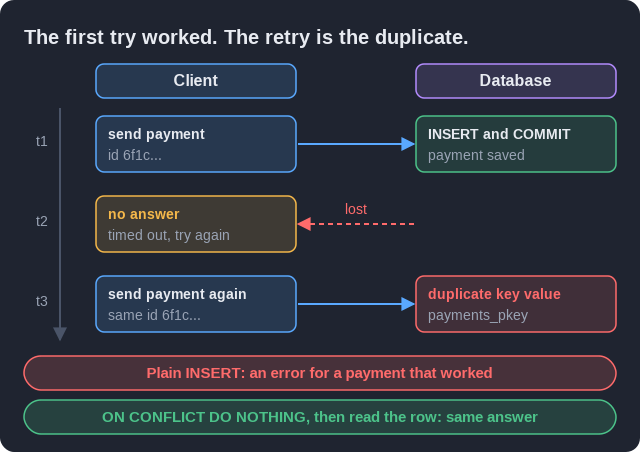
ERROR:  duplicate key value violates unique constraint "payments_pkey"
DETAIL:  Key (id)=(6f1c0e2a-0000-4000-8000-000000000042) already exists.
Here the error is the database doing its job. The constraint stopped a second
payment. The bug is that the client now sees a failure for a payment that
worked. The same thing happens when you store an idempotency key in a UNIQUE
column and let the plain INSERT fail.
The fix: treat the repeat as a lookup
INSERT INTO payments (id, user_id, amount_cents)
VALUES ('6f1c0e2a-0000-4000-8000-000000000042', 7, 2500)
ON CONFLICT (id) DO NOTHING
RETURNING id;
First try: one row back, so this request created the payment. Retry: 0 rows back (I ran both), so the payment is already there. Read it and return the same answer as the first time:
SELECT user_id, amount_cents, status
FROM payments
WHERE id = '6f1c0e2a-0000-4000-8000-000000000042';
Then compare the stored values with what the request carried. When the same id
arrives with a different amount, the second insert is also skipped (I ran
that too: amount_cents 99900 was skipped and the stored 2500 stayed). That is
not a retry. It is a client bug or a reused id, and silently returning the old
payment would hide it. The
IETF draft for the Idempotency-Key header
(draft-ietf-httpapi-idempotency-key-header-09, still an Internet-Draft, not
an RFC) says a server should answer 409 when the first request with that key
is still running. It also says 422 for the same key with a different request
body, but only when the server keeps a fingerprint of the body.
The retry can also arrive while the first request is still inside its transaction. The second insert then waits for the first to finish, as in cause 1, and skips the row afterwards. Either way, the answer is the same.
This is the core of idempotency, and idempotency keys explained covers the rest: how long to keep keys, what to store with them, and the case where the first request crashed half way.
Which fix for which message
| What you see | Cause | Fix | Not the fix |
|---|---|---|---|
Key is app-made (uuid, email, user_id). Two requests close together, second one fails | Check-then-insert race | ON CONFLICT (key) DO NOTHING or DO UPDATE | A SELECT before the insert, or a transaction around both |
| Key is an auto id. It fails a few times, then works. Started after a load, an import or a failover | Sequence behind the table | setval(pg_get_serial_sequence(...), max(id)) | ON CONFLICT (it would skip rows you wanted) |
| Key came from the client. The row exists and its contents match the request | Retry of a request that worked | ON CONFLICT DO NOTHING, read the row, compare the body | Retrying the insert again |
| The row exists and its contents differ from the request | Reused key, or a client bug | Reject with an error that names the key | Returning the old row as if it matched |
Questions people ask
Why does the duplicate key error go away if I retry the request?
Almost always a stale sequence. Each failed insert used up a number, so after
a few retries the counter passes the highest id in the table and the insert
works. In my run it took five failures. Do not rely on the retry. Run the
setval statement.
How do I reset a sequence in Postgres?
SELECT setval(pg_get_serial_sequence('orders', 'id'), max(id)) FROM orders;
sets the counter to the highest id, and the next insert gets one more. It works
for serial and identity columns. Run it after any load that wrote ids by
hand.
Does ON CONFLICT DO NOTHING use up sequence values?
Yes. A skipped row still takes a number from the sequence. In my test, three
skipped inserts and then a new key gave ids 1 and 4. The docs say numbers from
nextval are not given back, so gaps are normal. If you need ids without gaps,
a sequence is the wrong tool.
Why do I get “current transaction is aborted” after the duplicate key error?
In PostgreSQL, a failed statement puts the whole transaction in an aborted
state, and every later command fails until you roll back. Use
SAVEPOINT and ROLLBACK TO SAVEPOINT around an insert you expect might fail,
or use ON CONFLICT so it does not fail.
What if the error says “could not create unique index” instead?
That is a different moment. You tried to add a unique constraint or index to a
table that already has duplicates. I ran ALTER TABLE ... ADD CONSTRAINT ... UNIQUE (email) on a table with two 'a' rows and got could not create unique index "d9_email_key", with Key (email)=(a) is duplicated. Find and clean up
the duplicates first, then add the constraint.
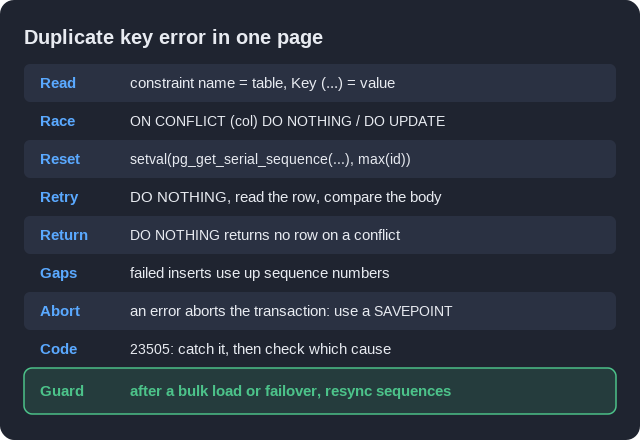
Cheat sheet
Further reading
- PostgreSQL docs: INSERT, including ON CONFLICT
- PostgreSQL docs: sequence manipulation functions (nextval, setval)
- PostgreSQL docs: system information functions (pg_get_serial_sequence)
- PostgreSQL docs: transaction isolation, Read Committed
- PostgreSQL docs: CREATE TABLE, identity columns
- PostgreSQL docs: error codes (23505 unique_violation)
- PostgreSQL 17 docs: logical replication restrictions (sequences)
- PostgreSQL 19 docs: logical replication of sequences
- PostgreSQL docs: pg_dump (sequence data)
- IETF draft: The Idempotency-Key HTTP Header Field
- Idempotency keys explained on this site
- PostgreSQL locks explained on this site
- Postgres as a job queue with SKIP LOCKED on this site

Backend engineer who builds high-volume systems that move money. More about Rafi