People say two things about saving a JPEG again. One: every save costs quality, so a photo that passes through enough hands turns to mush. Two: saving again with the same settings changes nothing. Both sound sure of themselves, and both are only half true.
So I ran it. I took one public-domain photo and re-saved it as a JPEG 100 times in a row, at quality 95, 85 and 75. Then I changed the quality at random between saves. Then I cropped a little off the edge between saves. After every save I measured the file size and how far the picture had drifted from the original.
Short version:
- Same settings, same pixels: the picture stops changing after a few saves. At quality 85 the file was byte-for-byte identical from save 18 on.
- A new quality each time keeps adding loss (similarity fell from 0.98 to 0.81 over 100 saves). A crop of 1 pixel each time is worse (down to 0.49), because it moves the 8 x 8 block grid the format works on.
- Saving at a higher quality afterwards repairs nothing. It only makes the file bigger.
How I tested it
The photo is a barrelfish near a deep-sea coral reef, taken by the NOAA Lophelia II expedition in 2009. It is in the public domain (file page on Wikimedia Commons). It has a dark background, a bright yellow rope, a hand-written label and lots of fine texture, which is what a JPEG finds hard.

The file is itself a JPEG (707,485 bytes). So “the original” below means the pixels you get from decoding that file. I cut it to 1920 x 1280 pixels so the size is a whole number of blocks. Every save used Pillow 12.0.0 (it uses libjpeg-turbo 3.1.2) inside a Docker container. Each round decoded the last file and saved it again.
For each save I recorded three things:
- File size, in bytes.
- SSIM, a score for how similar two pictures look. It compares small patches of brightness. 1.0 means identical. I used the scikit-image version, from Wang et al., 2004.
- PSNR, an older score in decibels, where higher means closer. It is in the CSV but I lean on SSIM here.
These are the setups. Each one ran for 100 saves:
| Setup | What changes between saves |
|---|---|
| Quality 95, 85 or 75 | Nothing |
| Quality 85 without colour shrinking | Nothing (explained below) |
| Alternate 95 and 75 | The quality |
| Random 70 to 95 | The quality, a different one each time |
| Crop 1 px, 8 px or 16 px | One, eight or sixteen pixel columns come off the left edge, quality 85 |
For the crops I compared each save with the same crop of the original. That way the score measures what JPEG did, not what the crop removed.
The raw numbers for every save are in a CSV:
jpeg-resave-measurements.csv.
You can check any chart in this post against it. The column chroma_abs_err is the mean absolute difference of the two colour channels (Cb and Cr, 0 to 255) from the original. The scripts that made the CSV (measure-resaves.py) and the block model behind the number lines (block-model.py) are next to it.
Same settings: it settles
Here is how much each save changed the picture. The picture is 1920 x 1280 pixels with 3 colour values each, 7,372,800 values in all. The chart counts the share of them that one save changed:
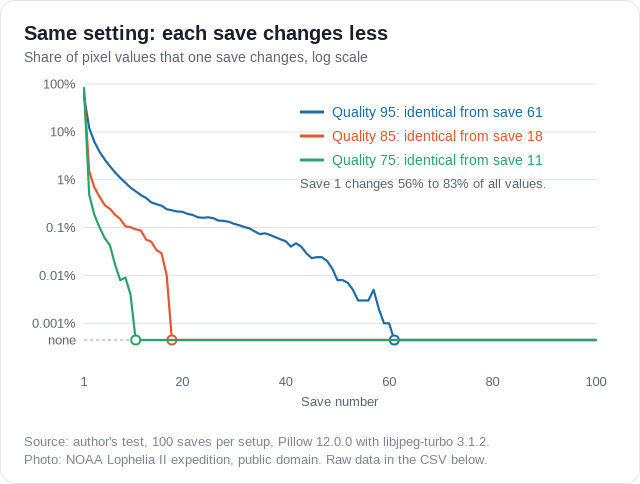
The first save does almost all of the work. After that each save moves fewer pixels, until a save changes none. The numbers:
| Quality | Values changed by save 1 | By save 2 | Identical file from save | Bytes after save 1 | Bytes after save 100 | SSIM |
|---|---|---|---|---|---|---|
| 95 | 56% | 12% | 61 | 755,911 | 751,825 | 0.998 |
| 85 | 74% | 1.5% | 18 | 465,052 | 465,036 | 0.987 |
| 75 | 83% | 0.48% | 11 | 304,968 | 304,936 | 0.971 |
| 85, no colour shrink | 67% | 0.06% | 6 | 591,594 | 591,638 | 0.987 |
“Identical file from save” means that save produced exactly the same bytes as the one before it, and so does every later save. Engineers call this idempotent: do it again and you get the same result. The post on idempotency keys uses the word for API retries. Here it applies to a photo.
Quality 95 is the slow one. It kept shifting pixels for 60 saves, and PSNR slid from 43.0 to 39.9 dB on the way. SSIM barely moved (0.9978 to 0.9977). The reason comes below.
You can try the settling yourself. This script saves a photo at quality 85 until two saves in a row match:
import io
from PIL import Image

# Crop to 1920 x 1280 so the size is a whole number of 16 x 16 pixel blocks.
img = Image.open("photo.jpg").convert("RGB").crop((0, 0, 1920, 1280))
previous = None

for n in range(1, 101):
    buffer = io.BytesIO()
    img.save(buffer, "JPEG", quality=85, subsampling="4:2:0")
    data = buffer.getvalue()

    if data == previous:
        print(f"save {n} is identical to save {n - 1}, byte for byte")
        break

    previous = data
    img = Image.open(io.BytesIO(data)).convert("RGB")
With the photo above it prints save 18 is identical to save 17. Without the
crop line the same photo (1921 pixels wide) took 24 saves, so the exact
number depends on the picture and its size.
What one save does
To see why it settles, and when it does not, you need to know what a JPEG save does. There are six steps:
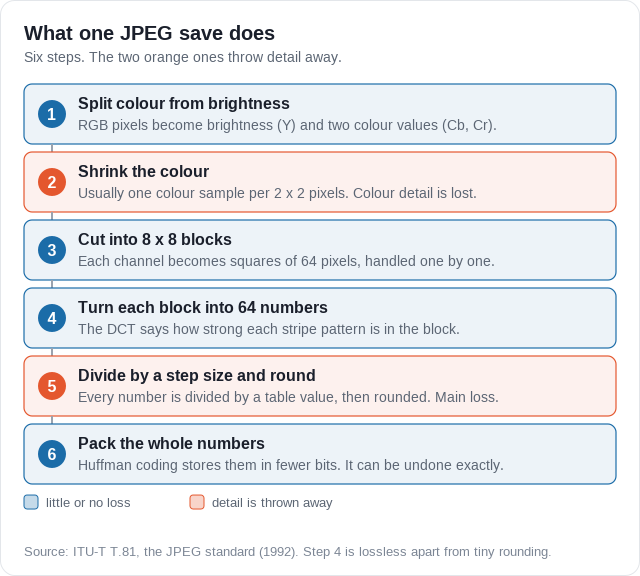
Three of those steps matter for this post.
Colour is shrunk (step 2). The eye is better at seeing brightness detail than colour detail, so JPEG keeps full-size brightness and cuts the two colour channels down. The usual choice, written 4:2:0, keeps one colour sample for each 2 x 2 pixels. My source file keeps a colour sample for every pixel (4:4:4). I told Pillow to use 4:2:0, so the colour got coarser right away. That is one reason the first save is the big one.
Blocks of 8 x 8 (steps 3 and 4). Every channel is cut into squares of 64 pixels, and each square is handled on its own. The DCT (discrete cosine transform) describes a block as a mix of 64 fixed patterns, from a smooth wash to a fine checkerboard. The 64 numbers say how much of each pattern the block holds. No detail is lost in this step. It is only a different way to write the same block.
Divide and round (step 5). This is where the loss happens. Each of the 64 numbers is divided by a step size from a table and rounded to a whole number. Fine patterns get big steps, because the eye misses them. Many of them round to zero, and zeros are cheap to store. The “quality” setting scales the whole table. This is the formula in the libjpeg-turbo source:
scale = 5000 / quality           when quality is below 50
scale = 200 - 2 * quality        otherwise
step  = (base_step * scale + 50) / 100    (whole number, at least 1)
The base table comes from the JPEG standard (ITU-T T.81, Annex K). Take the base step 11, which sits next to the top-left corner. At quality 85 the scale is 30, so the step is 3. At quality 80 the scale is 40, so the step is 4. For the whole brightness table, quality 95 gives steps from 1 to 12, quality 85 from 3 to 36 and quality 75 from 5 to 61. These are my own sums from the formula, and they match the table Pillow wrote for quality 85.
Why the same setting settles
Now take one of those 64 numbers. This is a real one: a stripe strength from one 8 x 8 block of the photo. To get it I wrote a small model of the brightness steps (my own DCT, the libjpeg tables), so treat it as an illustration, not as a trace of Pillow’s inner workings.
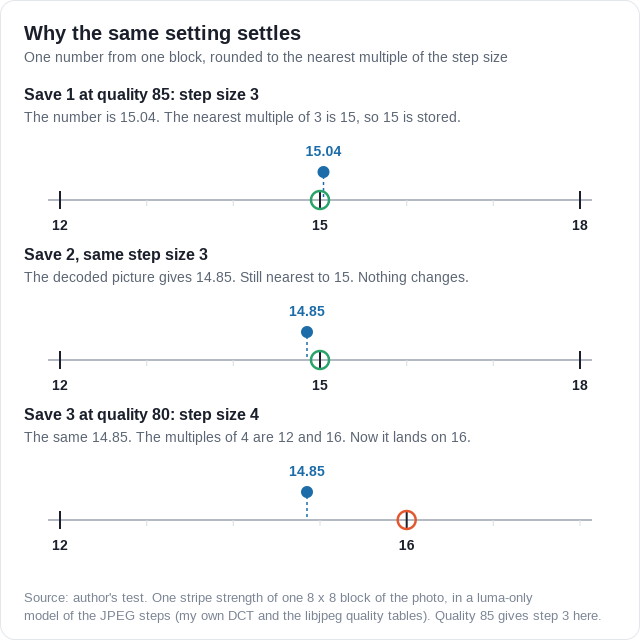
Saving does not store 15.04. It stores the whole number 5, which stands for 5 x 3 = 15. When you open the file, the picture is built from 15. The picture is then rounded to whole pixel values (0 to 255), and that adds a little noise. So the next save reads 14.85, not 15.00. But 14.85 is still far closer to 15 than to 12 or 18, so it rounds to the same whole number, 5. Same number in, same file out. The noise is smaller than half a step, so it cannot change the answer.
Change the step and the landing spots move. With a step of 4, the spots are 12 and 16, and 14.85 is nearer to 16. The number jumps. In my model, going back to step 3 on the next save gave 16.40, which landed on 15 again. It bounced between two values.
That also explains the quality 95 tail. Its steps are small (1 to 12), so half a step is a thin cushion, and the pixel rounding noise is big enough to push more numbers over the line. They keep flipping until each settles. In my simplified model with quality 85 steps, no block was still changing by the fifth pass. Nothing about this is guaranteed: it depends on the same program decoding and encoding, with the same settings.
A new setting keeps losing
Now the other half. Here is the similarity to the original after every save when something changes between saves:
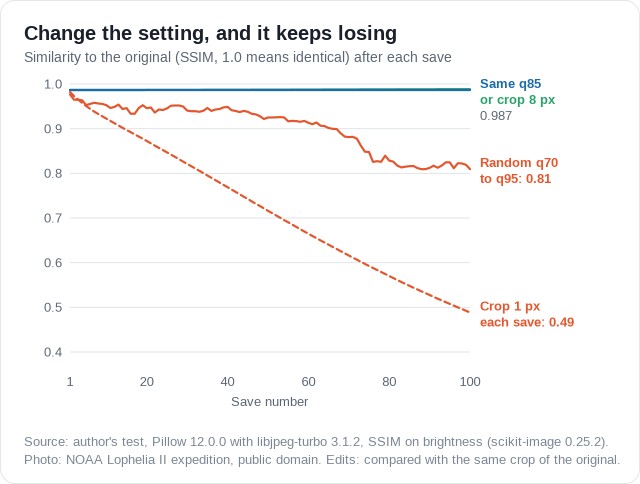
The random run (quality drawn from 70 to 95, mean 81) fell from 0.977 to 0.81 and then bounced around 0.81 to 0.83 for the last 20 saves. For comparison, a single save at quality 70 scores 0.967. A hundred random saves cost far more than the worst single one. The reason is the one from the number lines. Each new step size has new landing spots, so each save re-rounds the numbers and the errors pile up. A 2023 paper tested codecs, traditional and neural, on recompression at varying qualities and found that they are not stable. That matches what I saw.
Two small surprises from this run:
- Alternating just two settings also settles. I alternated 95 and 75. From save 29 on, the same two files repeated for the remaining 72 saves, one of 604,377 bytes and one of 315,830. Each save still changed 18.5% of the values, but the next one changed them back. The loss does not grow without end here. A new setting each time is what keeps it going.
- Saving higher repairs nothing. Each quality 95 save in that run made the file 1.9 times bigger than the quality 75 save before it (604,668 bytes on save 3, 315,959 on save 2), and the picture was no closer to the original (SSIM 0.970 both times). The extra bytes store the damage carefully.
A crop moves the grid
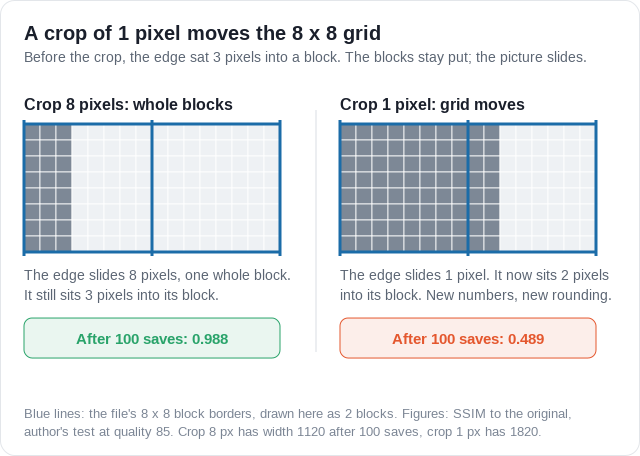
The blocks are 8 x 8 pixels, starting at the top-left corner of the picture. When you crop 1 pixel off the left edge, everything slides left by one pixel and the blocks do not. Each new block now holds a slice of two old ones. The numbers the last save rounded so carefully mean nothing for these new blocks, and the picture is rounded again from scratch.
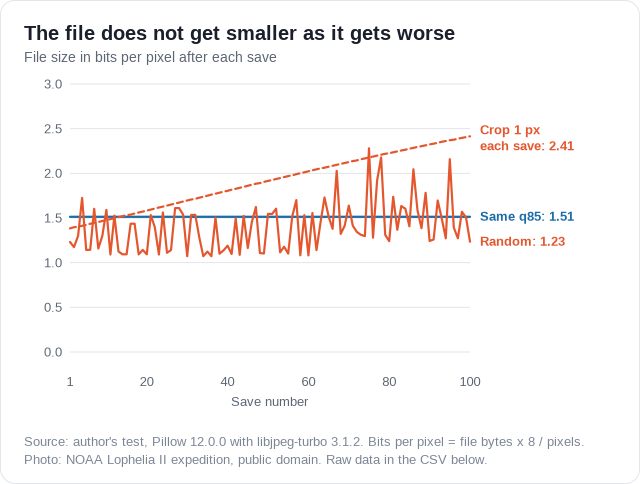
The result is the dashed line in the chart above. The similarity fell to 0.97 after 2 saves, 0.92 after 10 and 0.49 after 100. The file also grew from 424,769 to 703,147 bytes, even though the picture lost 100 columns of pixels. The new block edges are noise, and noise costs bytes. The chart below shows size as bits per pixel, so crops and full frames compare fairly:
An 8 pixel crop, one whole block, left the brightness blocks where they were.
Its similarity stayed at 0.987 to 0.988. But the colour is a different story.
With 4:2:0, a colour block covers 16 x 16 pixels, so the colour grid needs a
16 pixel move to stay put. After an 8 pixel crop each time, the average
colour error (the mean difference in the two colour channels, on a 0 to 255
scale) rose from 1.01 to 1.35. With a 16 pixel crop it stayed at 1.02, and
with 4:4:4 and an 8 pixel crop it stayed at 0.37 to 0.34. This lines up with
the manual of jpegtran, a tool that crops without decoding: the top-left
corner of the crop must sit on an “iMCU boundary”, or it is moved to the
nearest one. For 4:2:0 that unit is 16 x 16 pixels.
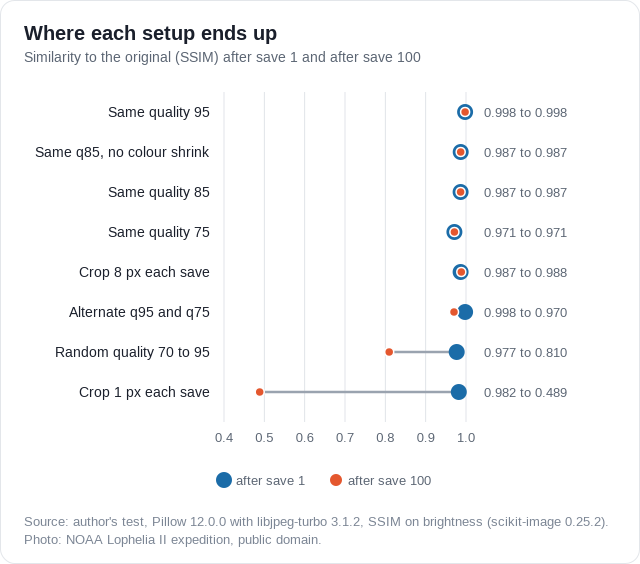
Here are all the setups at once, with the similarity after save 1 and after save 100:
What it looks like
Numbers hide how it looks. These are crops of 64 x 48 pixels, zoomed 6 times. The faint grid is the file’s own 8 x 8 blocks. This is the hand-written label next to the rope, after 100 saves:
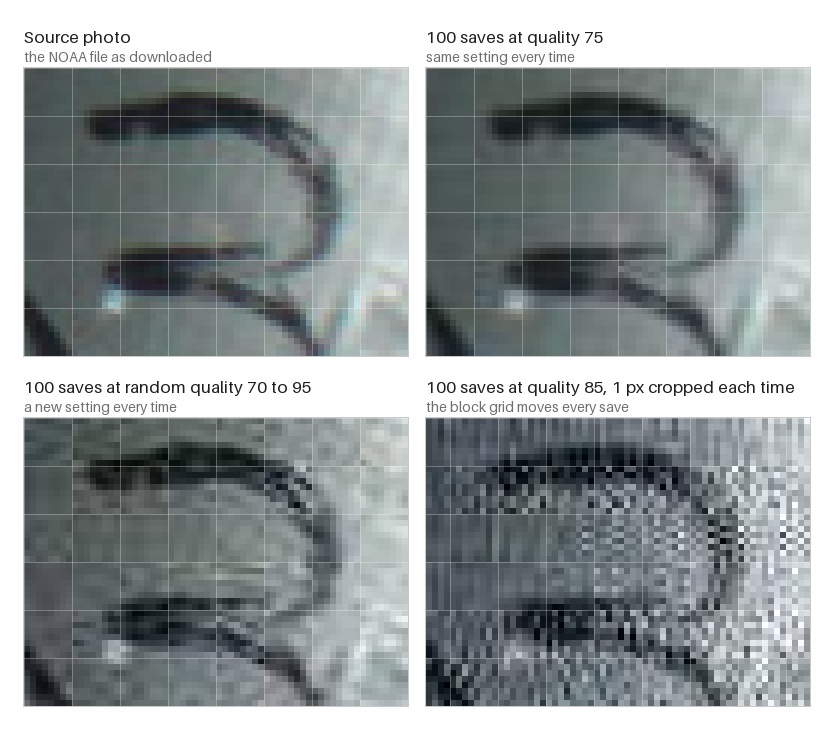
The quality 75 copy looks like the source with a little less fine detail. The random-quality copy has blocky, flat patches. The crop copy is covered in checkerboard noise, with the old and new grids fighting each other.
Colour shows up on the yellow rope:
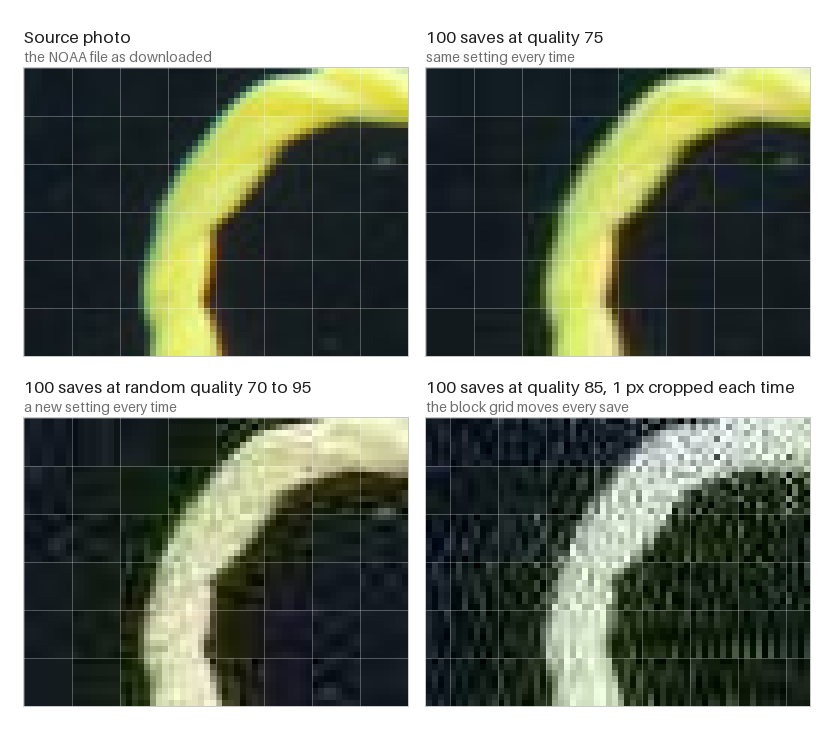
In the two runs where the setting or the grid kept changing, the yellow turned cream. I did not chase the cause. My guess is that a very bright, saturated yellow sits near the edge of what the colour range can hold, and each round trip clips a little of it. That is a guess, not a result. Brightness-only SSIM would not catch this at all, which is why I also stored a colour error in the CSV.
What I did not test
- One photo, one encoder. Pillow with libjpeg-turbo does the same decoding and encoding every round. Another program may decode to slightly different pixels, and then the settling may not happen.
- No other edits. I did not rotate, change brightness or add text between saves. I tried one resize (to 95% and back to full size) between saves. A chain of those resizes with no JPEG at all dropped SSIM to 0.63, and with JPEG saves at quality 85 it was 0.98. The resizing did more damage than JPEG, so that test says little about JPEG and I left it out of the charts. Its rows are in the CSV.
- Quality 100 and progressive files. Not measured.
What to do about it
Keep the original, or a lossless copy of it (PNG or TIFF), and do every edit from that. Save a JPEG once, at the end. If you need a file under a size limit, make it from the original in one go, for example with Pinchr on Android or the photo size tool in the browser. A second pass on an already-shrunk file starts from the damage.
If you must re-save a JPEG, use the same settings and do not crop by
a number of pixels that is not a multiple of 16. To crop or rotate without
re-encoding at all, a tool such as jpegtran works on the stored numbers
directly, and the manual says its transformations are lossless.
Questions people ask
How many times can you save a JPEG before it looks bad? There is no fixed number. In my test with the same settings every time, the picture stopped changing after 11 to 61 saves and stayed close to the first save. With a new quality each time, the similarity score had dropped to about 0.95 by save 20 and 0.81 by save 100. With a 1 pixel crop each time, 0.87 by save 20. It depends on the photo and the settings, so these are one photo’s numbers.
Does re-saving a JPEG at a higher quality fix it? No. The detail was rounded away on an earlier save and a higher quality cannot bring it back. In my run, saving at 95 after 75 made the file 1.9 times bigger and left the similarity score where it was.
Is saving at quality 100 lossless? Not by the format’s rules. The libjpeg source says that at 100 every step size becomes 1, “hence, minimum quantization loss”, and minimum is not zero. Colour shrinking and pixel rounding still apply. I did not measure it. For real lossless files, use PNG or TIFF.
Does cropping or rotating a JPEG lose quality?
In an ordinary photo editor, yes: the file is decoded, changed and saved
again, so it is re-rounded. Cropping 1 pixel cost far more than cropping 8,
because of the block grid. A tool like jpegtran can crop and rotate without
decoding, as long as the crop starts on an iMCU boundary (16 px for 4:2:0, 8 px for 4:4:4).
Why do JPEGs show little squares? Each 8 x 8 block is rounded on its own. Near a sharp edge, neighbouring blocks round differently, and the seam between them shows. The more a picture is squeezed, or the more its blocks are re-rounded on a moved grid, the more visible the seams.
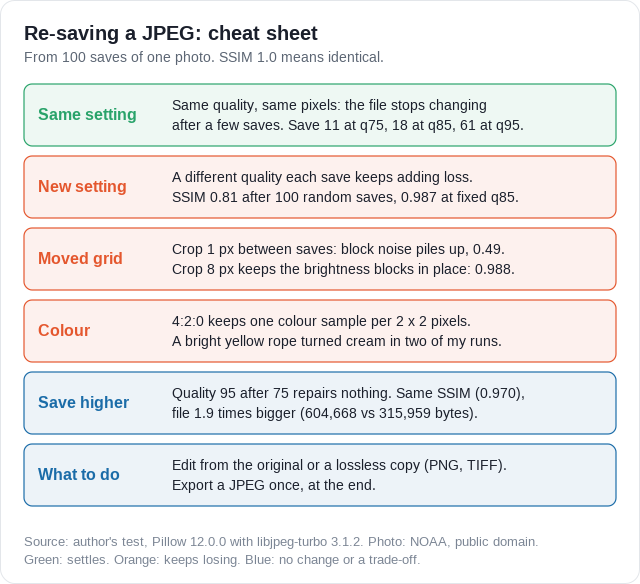
Cheat sheet
Further reading
- ITU-T T.81, the JPEG standard (8 x 8 blocks, the DCT, quantisation tables in Annex K)
- libjpeg-turbo, jcparam.c: how the quality number scales the tables
- libjpeg-turbo, the jpegtran manual: lossless crop and rotate, and the block boundary rule
- Pillow: JPEG saving options (quality, subsampling)
- scikit-image: structural_similarity and Wang et al., 2004
- Evaluating Strong Idempotence of Image Codec (Zhang et al., 2023)
- Cloudinary: why JPEG is like a photocopier, a worked example of rounding error adding up
- The photo on Wikimedia Commons, NOAA Lophelia II expedition, public domain
- Raw measurements, CSV from my test
- Idempotency keys explained on this site, for the same word in another job

Backend engineer who builds high-volume systems that move money. More about Rafi