A QR code on a café table has a coffee ring across one corner. It still opens the menu. Put a thumb over the middle and it often still opens. Put the thumb over one of the three big squares in the corners and it stops.
That odd pattern of what survives and what does not is the whole design. This post takes a real, tiny QR code apart square by square, reads it by hand, and then breaks it on purpose to see what the repair data can and cannot save.
Short version:
- A QR code is a grid of small dark and light squares. Three big squares in the corners let a scanner find it at any angle. A strip next to them says how to read the rest. The data runs in a zigzag, eight squares per byte.
- Each code carries extra “repair bytes” (Reed-Solomon codes, the same family of maths used on music CDs). They fix whole bad bytes, not bad squares. A solid blotch is much kinder than the same number of scattered specks.
- The four levels L, M, Q and H trade space for repair. In my test, a solid patch could cover about half of what the headline percentages suggest.
A code you can read by hand
I made a version 1 code, the smallest size, that holds the text
LOOMLOOPS.COM. I used error level M, which is the middle setting and the one
Denso Wave, the company that invented the code, says is chosen most
often. It is 21 squares
wide and 21 high. Each square is called a module.
Then I wrote a short decoder of my own that reads the code the way a scanner does, and checked every step against the library that made it. All the numbers below come from that run.
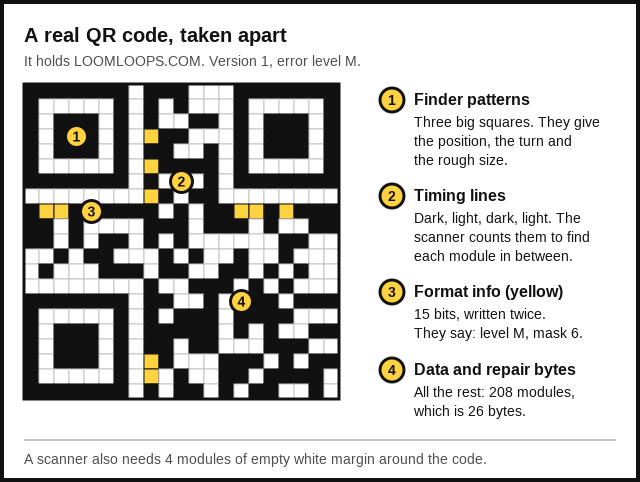
Finder patterns. The three big squares are each 7 modules wide: a dark ring, a light ring, then a dark 3 x 3 block. Walk a line through the middle of one in any direction and you cross dark, light, dark, light, dark in the proportion 1:1:3:1:1. That ratio is easy to spot at any angle, which is why a scanner can find the code lying sideways or upside down. Denso Wave says it picked 1:1:3:1:1 because it was the ratio least likely to turn up in ordinary printed matter, and that this is how the square marks came about. There are three of them, not four. The empty fourth corner tells the scanner which way is up.
Timing lines. Row 6 and column 6 alternate dark, light, dark, light between the finders. They give the scanner a ruler, so it knows where each module sits even if the print is a little stretched.
Format information. Every code carries a 15-bit label, written twice (once around the top left finder and once split between the other two). It holds the error level, the mask number (next section), and 10 bits of repair data for the label itself. Here is the label from my code, read from the picture:
bits as printed               100111110010111
XOR with a fixed pattern      101010000010010
result                        001101110000101

split into                    00    110    1110000101
                              |     |      '-- 10 repair bits for the label
                              |     '-- mask number 6
                              '-- error level M (the standard writes M as 00)
The fixed pattern is part of the standard. The two copies were identical in my code, as they should be.
The quiet zone. The code also needs an empty white margin, at least 4 modules wide, on every side. Denso Wave says standard QR needs “a margin of 4 module-worth at least”. A tight crop can break a code that is otherwise perfect.
The mask
If you wrote the data straight into the grid, some messages would look awful. A message of all zeros makes one huge white area, and a scanner has nothing to lock on to. Some data would also happen to draw a fake finder pattern.
The fix is a mask: one of eight fixed patterns that flips selected data modules, dark to light and light to dark. The encoder tries all eight and keeps the one that scores best on four rules: long runs of one colour, 2 x 2 blocks of one colour, finder-like patterns, and a dark share far from 50% (Nayuki’s walkthrough has the scoring). The mask number goes into the format label, so the scanner knows which one to undo.
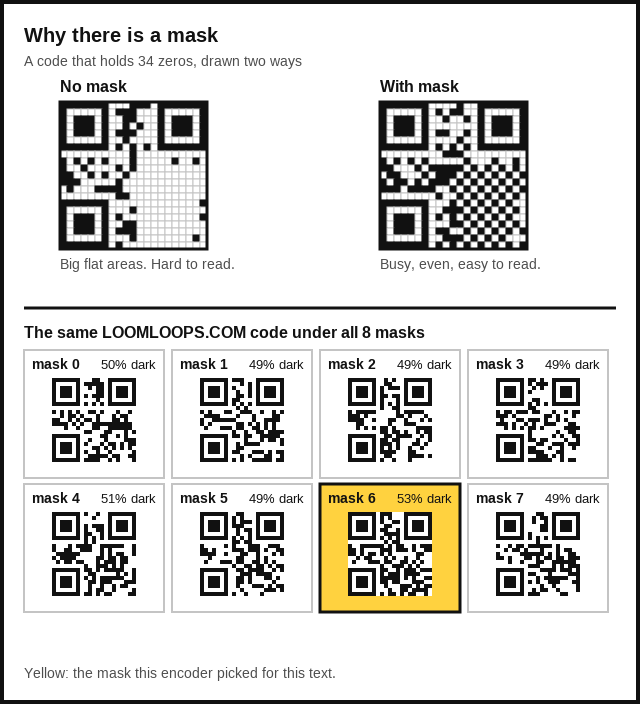
Each mask is a short rule on the row and column of a module. Mask 6, the one in
my code, flips a module when ((row * column) mod 2 + (row * column) mod 3) mod 2 is 0. The full list, from the Thonky tutorial:
| Mask | Flip the module when |
|---|---|
| 0 | (row + column) mod 2 = 0 |
| 1 | row mod 2 = 0 |
| 2 | column mod 3 = 0 |
| 3 | (row + column) mod 3 = 0 |
| 4 | (floor(row / 2) + floor(column / 3)) mod 2 = 0 |
| 5 | (row * column) mod 2 + (row * column) mod 3 = 0 |
| 6 | ((row * column) mod 2 + (row * column) mod 3) mod 2 = 0 |
| 7 | (((row + column) mod 2) + ((row * column) mod 3)) mod 2 = 0 |
I scored all eight masks myself with the four rules and got mask 1 as the winner, not mask 6. The library picked 6. My scorer counted the format label modules, and the standard scores the symbol without the format and version information, which the library follows. It does not matter for scanning, because the label always says which mask was used. Only the data and repair modules are masked. The finders, timing lines and format label are left alone.
The zigzag
The data modules are read in strips two modules wide. The path starts in the bottom right corner, goes up one strip, turns, goes down the next, and so on. It jumps over the timing column and the corner patterns.
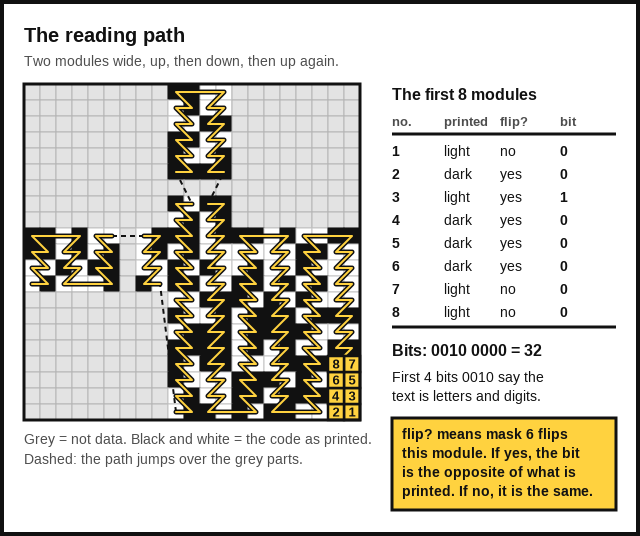
Take the first eight modules in that order. Some are printed dark, some light.
Mask 6 flips some of them. After undoing the mask, the bits are 00100000,
which is the number 32. A scanner now has its first byte.
The first four bits, 0010, name the mode. Mode 0010 means
alphanumeric: digits, capital letters and a few symbols (space and $ % * + - . / :).
The next 9 bits, 000001101, are the length: 13 characters, and
LOOMLOOPS.COM is 13 characters. Then the text, two characters at a time in 11
bits. Give each character a number (0 to 9 are themselves, A is 10, L is 21, O
is 24) and combine a pair as first * 45 + second:
"LO" -> 21 * 45 + 24 = 969 -> 01111001001
Those 11 bits are exactly the next 11 modules after the length. Two characters
in 11 bits is 5.5 bits per character, against 8 for plain text. After the last
character come 0000 (an end marker), a few zeros to fill the byte, and then
padding bytes that alternate 11101100 and 00010001 (236 and 17) until the
data area is full.
My code holds 26 bytes in total. The first 16 are data. The mode (4 bits), the length (9 bits), the text (72 bits) and the end marker make 89 bits. Zeros fill that out to 12 bytes, and 4 padding bytes complete the 16. The last 10 bytes are the repair bytes.
Repair bytes: Reed-Solomon in plain words
Here is the idea with a school-maths picture. Two points fix a straight line. Three points fix a parabola. Now say the message is three numbers, and you send them as three points on a parabola. If you also send two more points on the same parabola, the receiver gets five points. Lose any two of them and the three left still fix the one parabola that passes through them all. The two missing points can be worked out again.
Reed-Solomon codes do this with bytes instead of points on a drawing. The data bytes are treated as the numbers of a polynomial (the curve), and the repair bytes are extra points, worked out by polynomial division in a small number system with exactly 256 values (one value for each possible byte). The division remainder is the repair bytes. Irving Reed and Gustave Solomon described these codes in a short paper in 1960. Denso Wave’s own page says the repair data needs twice as many codewords as the number it can correct, and that the same maths is used for music CDs.
A JPEG goes the other way: it throws detail away on purpose to save bytes, and re-saving one shows what that costs.
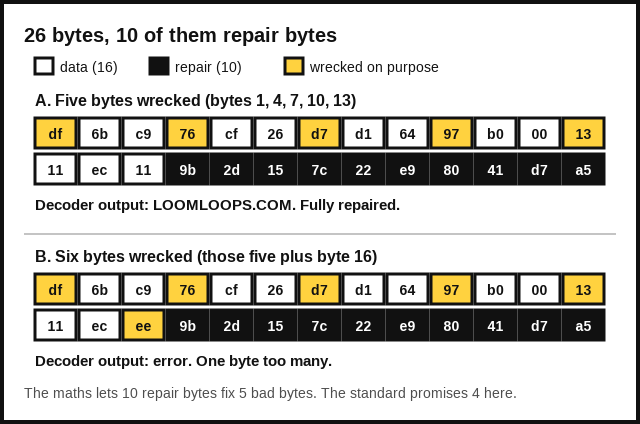
So the maths lets 10 repair bytes fix up to 5 wrong bytes when nobody says
which bytes are wrong. The standard promises a little less for the smallest
codes (4 for this one, more on that below). I tried it on the 16 data bytes of my code, with the reedsolo library set up the way the
QR standard sets it up (the number system’s constants 0x11D and 2, which
Thonky’s tutorial
lists):
import reedsolo

data = bytes([32, 107, 201, 137, 207, 38, 40, 209, 100, 104, 176, 0, 236, 17, 236, 17])
rs = reedsolo.RSCodec(10, fcr=0, prim=0x11D, generator=2)

packet = bytearray(rs.encode(data))
print(list(packet[16:]))            # the repair bytes

for i in (0, 3, 6, 9, 12):          # wreck 5 bytes
    packet[i] ^= 0xFF
print(bytes(rs.decode(bytes(packet))[0]) == data)

packet[15] ^= 0xFF                  # wreck a 6th
try:
    rs.decode(bytes(packet))
except reedsolo.ReedSolomonError as e:
    print("failed:", e)
It printed:
[155, 45, 21, 124, 34, 233, 128, 65, 215, 165]
True
failed: Too many errors to correct
The ten repair bytes match the last ten bytes my decoder read out of the printed code. My decoder fixed five wrecked bytes and the text came back. A sixth stopped it.
Four levels: L, M, Q and H
The error level sets how many repair bytes a code gets. The names stand for Low, Medium, Quartile and High, and the headline figures are about 7%, 15%, 25% and 30% of the bytes. Denso Wave says higher levels correct more but make the code bigger, level L suits clean places with a lot of data, and Q or H suit dirty places.
In my version 1 code, the same 26-byte frame is split like this:
| Level | Data bytes | Repair bytes | Maths allows | Standard promises |
|---|---|---|---|---|
| L | 19 | 7 | 3 | 2 |
| M | 16 | 10 | 5 | 4 |
| Q | 13 | 13 | 6 | 6 |
| H | 9 | 17 | 8 | 8 |
Data and repair counts are from the Thonky error correction table. “Maths allows” is half the repair bytes, rounded down: the number of wrong bytes that can be fixed when nobody says which bytes are wrong. The smallest versions keep a byte or two of the repair data back to catch a wrong repair, so the standard promises a little less for L and M. The right-hand column is second-hand: the standard is paywalled and I did not read it. My decoder was not bound by it and fixed 5 bytes at level M.
Bigger codes do not use one long Reed-Solomon word. They split the data into several blocks, each with its own repair bytes, and then interleave the bytes of the blocks. A version 7 code at level H, for example, has five blocks that can each fix 13 bytes. Interleaving is what makes a solid blotch survivable: the damaged bytes sit next to each other in the printed code, but they come from different blocks, so each block only sees a few of them.
Versions and capacity
There are 40 versions. Version 1 is 21 x 21 modules, and each version adds 4
modules per side, so the side is 4 x version + 17. Version 40 is 177 x
177.
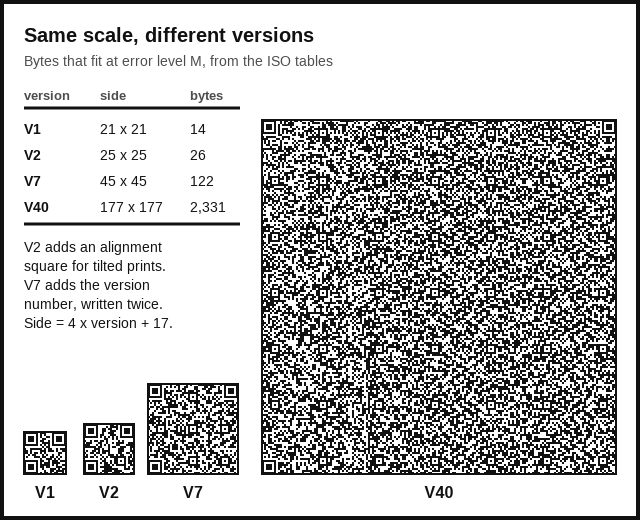
Two things appear as a code grows. From version 2, small alignment patterns (a 5 x 5 square) help the scanner follow a bent or tilted print. From version 7, the version number itself is written twice near the finders, with repair bits. Version 1 does not need either.
How much fits depends on the version, the level and the mode. Here is the capacity in byte mode (plain 8-bit text, the mode most URLs use), from every version and level:
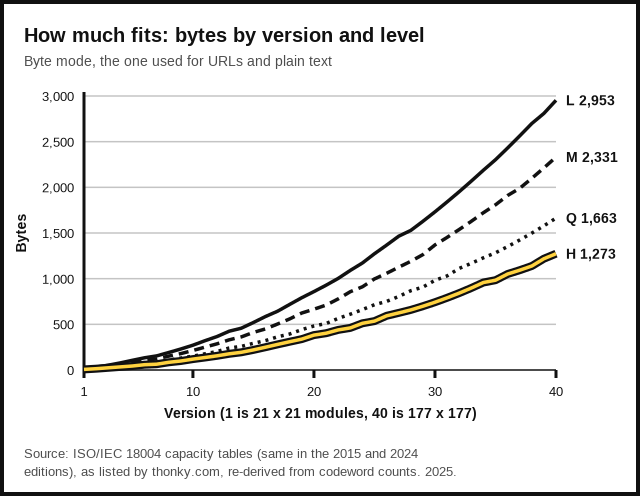
| Version | Side | L | M | Q | H |
|---|---|---|---|---|---|
| 1 | 21 x 21 | 17 | 14 | 11 | 7 |
| 10 | 57 x 57 | 271 | 213 | 151 | 119 |
| 25 | 117 x 117 | 1,273 | 997 | 715 | 535 |
| 40 | 177 x 177 | 2,953 | 2,331 | 1,663 | 1,273 |
I took these from the tables published at
thonky.com, then
re-derived all 160 numbers from the standard’s codeword counts with the
segno library. They matched. The standard is ISO/IEC
18004. The 2024 edition is the current
one. It replaced the 2015 edition, which ISO lists as withdrawn since August
2024. Both are paywalled and I read neither. The capacity numbers I used are the
2015 ones as published, and they are the same in the 2024 edition.
Digits-only text uses numeric mode, which packs three digits into 10 bits. The same version 40 level L code that holds 2,953 bytes holds 7,089 digits.
A practical effect: fewer bytes means a smaller version, which means bigger
modules at the same print size, which scan more easily. My page’s address,
https://loomloops.com/post/how-qr-codes-work/, is 45 characters. At level M it
needs version 4 (33 x 33). Written in capitals it can use alphanumeric mode, and
the same address fits in version 3 (29 x 29). The catch: the host name does not
care about case, but the path on many servers does, so only do this when you
know the path survives it.
When it breaks
A solid patch against scattered specks
The repair bytes count bytes, and a byte is 8 modules. Flip one module and its whole byte is wrong. So 34 flipped modules scattered over a version 7 code (196 bytes in total) hit about 31 different bytes. The same 34 modules in one blotch would hit only a handful.
I tested it. I took a version 7 code that holds loomloops.com/qr, flipped
random data modules, and tried to read each result with OpenCV’s QR reader, 20
tries per setting:
| Modules flipped | L | M | Q | H |
|---|---|---|---|---|
| 34 (2% of the 1,719 I allowed) | 0 of 20 | 3 of 20 | 17 of 20 | 20 of 20 |
| 68 (4%) | 0 of 20 | 0 of 20 | 0 of 20 | 5 of 20 |
| 6% or more | 0 of 20 | 0 of 20 | 0 of 20 | 0 of 20 |
I let it flip any module outside the corner patterns, the timing lines and the centre pattern. A speckle of 34 squares in a 2,025-square code is nothing you would notice by eye. At level L it was enough to stop every read.
A solid patch in the middle
Now the case that matters for logos. I covered a square in the middle with white, made it one module larger each time, and noted the largest square that still read. Five random texts per level, the median, on versions 4, 7 and 10.
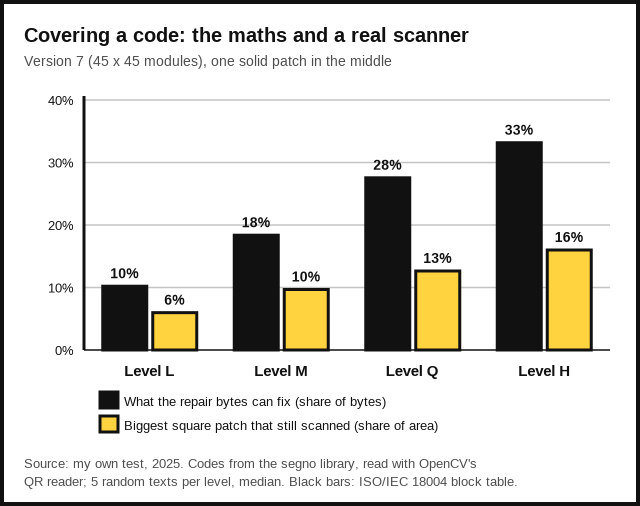
| Version | Level | Bytes the maths can fix | Biggest patch that still read |
|---|---|---|---|
| 4 | L | 10% | 4.5% of the area |
| 4 | M | 18% | 9.2% |
| 4 | Q | 26% | 11.1% |
| 4 | H | 32% | 15.5% |
| 7 | L | 10% | 6.0% |
| 7 | M | 18% | 9.7% |
| 7 | Q | 28% | 12.6% |
| 7 | H | 33% | 16.0% |
| 10 | L | 10% | 6.0% |
| 10 | M | 19% | 13.6% |
| 10 | Q | 28% | 20.8% |
| 10 | H | 32% | 22.4% |
The second column is the total repair capacity divided by the total bytes, using the block sizes from the standard’s table. The third is what I measured. In every row the patch is smaller than the maths limit, between about half and three quarters of it. Three reasons I can think of, none of which I isolated:
- A patch also spoils the bytes along its edge, so it hits more bytes than its area suggests.
- A reader may not use every repair byte it could.
- Versions 7 and 10 have an alignment pattern in the centre, and a patch that covers it may confuse a reader that leans on it.
Two cautions about my numbers. They come from one reader, and phone scanners differ. Also, that reader failed on 2 of the 60 undamaged codes I generated (both version 10), which is why I used medians. Treat the table as a picture of the shape, not as a promise.
A separate run with loomloops.com/qr at version 7, level H gave the same
picture: a 19 x 19 patch (17.8% of the area) read, a 20 x 20 patch (19.8%) did
not, and a 25 x 25 patch (30.9%, the “30%” people quote) did not either.
So “a logo can cover 30%” is the wrong way to read the level H figure. In my test about a sixth of the area was a safe size, and a designer who wants a logo in the middle should pick level H, keep the logo small, and try the result on real phones. Denso Wave’s own answer for pictures is a separate variant, Frame QR, which leaves a canvas area for text or images.
Hiding a finder pattern
I covered the top left finder (with its white edge) on a version 7, level H code. The reader failed. The repair bytes protect the data, not the three squares used to find the code, so no level saves a code that has lost one.
Which level should you use?
| Level L | Level M | Level Q | Level H | |
|---|---|---|---|---|
| Good for | Clean screens, lots of data | A default for most prints | Prints that get scuffed | Logos in the middle, rough surfaces |
| Cost | Smallest code | Small | Bigger | Biggest. At version 10, 119 bytes against 271 for L |
| Watch out for | A few specks can stop it (0 of 20 reads at 2% in my test) | Same, a little more room | A patch of 11 to 21% of the area, depending on version, in my test | A bigger code means smaller modules at the same print size |
Questions people ask
How do QR codes work? A scanner finds the three corner squares, which give position, rotation and size. It reads the format label to learn the error level and mask. It undoes the mask, reads the modules in a zigzag to get bytes, fixes bad bytes with the repair bytes, and then decodes the result as numbers, letters or bytes.
Why does a QR code still scan when it is torn or has a logo on it? Each code carries repair bytes worked out from the data with Reed-Solomon maths. If some bytes are wrong, the scanner can rebuild them. It only works up to a limit, and the limit counts bytes, not area. In my test, a solid patch of 16% of the area was about the most a version 7 level H code took.
What do error correction levels L, M, Q and H mean? They are four settings for how many repair bytes a code carries. L has the fewest and M is the common default. Q and H add more repair bytes, and the code gets bigger. The usual figures are about 7%, 15%, 25% and 30% of the bytes.
How much data can a QR code hold? At most 2,953 bytes of plain text, or 7,089 digits, in a version 40 code at level L. A higher level holds less: 1,273 bytes at level H. Short messages need a much smaller code, and a smaller code is easier to scan.
Can a QR code be scanned upside down or at an angle? Yes. The three finder squares have the ratio 1:1:3:1:1 along any line through their middle, so a scanner can find them at any angle, and the missing fourth corner tells it which way is up. Denso Wave says one aim was reading from any of 360 degrees.
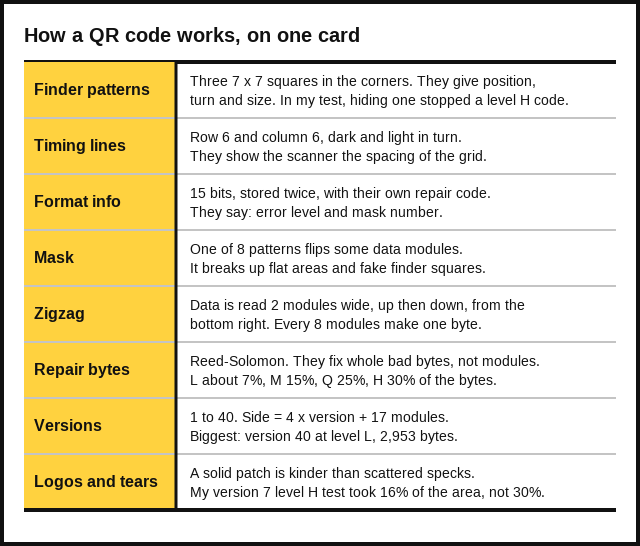
Cheat sheet
Further reading
- QR Code history, Denso Wave: why it was invented, the 1:1:3:1:1 ratio, and the patent stance. Denso Wave kept the patent rights and said it would not exercise them.
- Error correction, Denso Wave and versions
- ISO/IEC 18004 on iso.org: the standard (the 2015 edition’s page; ISO replaced it with a 2024 edition)
- QR Code Tutorial, Thonky: every table and the Reed-Solomon steps
- Creating a QR code step by step, Nayuki
- Polynomial Codes over Certain Finite Fields, Reed and Solomon, 1960

Backend engineer who builds high-volume systems that move money. More about Rafi