You save a login on your laptop. A second later it is on your phone. In between, the vault passed through a server that a company runs. That company has staff, backups, and a hosting provider, so it is fair to ask: could any of them read your passwords?
For the designs I read about below, the answer is meant to be no. The server keeps a locked box and never gets the key. This post shows how the key is made, why making it slow is the whole point, what an attacker gets if the server is copied, and what passkeys change.
Short version:
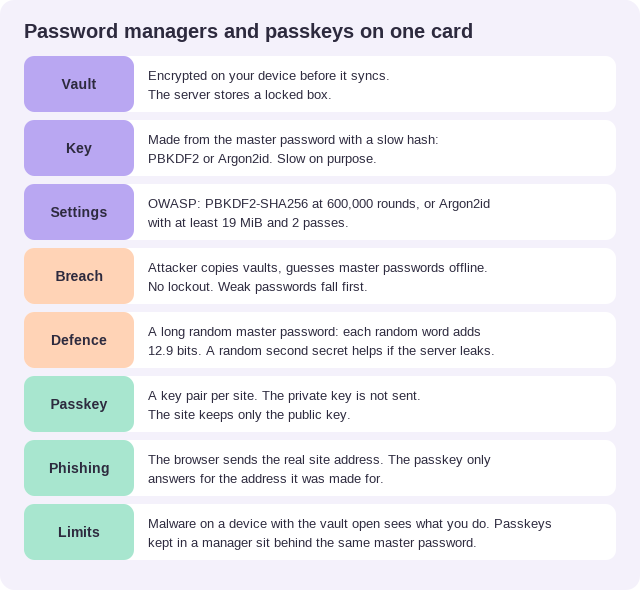
- Your device scrambles (encrypts) the vault before it syncs. The key comes from your master password, and the password itself is never sent.
- The key is made with a deliberately slow function (PBKDF2 or Argon2id). If someone copies the server, that slowness is the only thing between them and your master password. A weak master password still falls.
- A passkey replaces the shared secret with a key pair per site. The server keeps only a public key, and the browser ties each signature to the real site address, so a lookalike site gets nothing.
What lives where
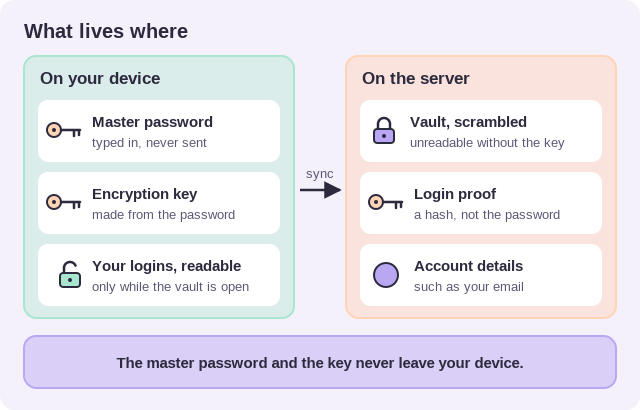
A password manager has two jobs. It stores your logins, and it keeps them in step across devices. The trick is to do the second job without trusting the server with the first.
Two words need explaining:
- Encryption scrambles data so it can only be read with a key. With the key you can get the original back.
- A hash is a one-way scramble. You cannot get the original back from it. You can only check a guess by hashing the guess and comparing.
The vault is encrypted on your device. Bitwarden’s encryption page says it uses AES with 256-bit keys in CBC mode, plus an HMAC (a check code that shows whether anyone changed the data). Vendors call this “zero knowledge”. It means the company has no key to read your data.
The server stores what it needs to sync and to check that you are you. Bitwarden’s security white paper lists four kinds of data on its server: authentication data, the data used to open the vault, the encrypted vault, and encrypted key pairs. 1Password’s security design document says the vault items on its server hold encrypted overview and detail data, and that it never has an unencrypted vault key. It also says some account fields, such as a user name and email address, are stored in the clear. Read each vendor’s page for what is and is not encrypted. It is not the same everywhere.
From a master password to a key
You type a master password. The app turns it into an encryption key with a key derivation function (KDF). A KDF takes a password and some extra input, and produces a fixed-size key. The extra input is a salt: a value that differs per user, so two people with the same password still get different keys. Bitwarden uses your email address as the salt. The PKCS #5 standard says a salt exists so that an attacker cannot precompute all the keys in advance.
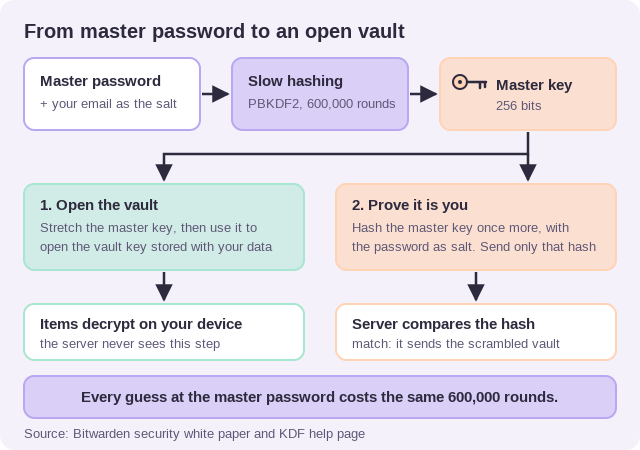
The master key does two jobs, and they are kept apart on purpose. One path opens the vault on your device. The other makes a separate hash that goes to the server so it can check you. The server learns something that proves you know the password. It does not learn anything that opens the vault. Bitwarden’s white paper describes the first path as the master key being stretched with HKDF (a way to turn one key into several) into the key that decrypts your vault key. The login hash is a second PBKDF2 run, with the master key as input and the master password as the salt. The server then hashes it again with its own salt before it stores it.
Here is the slow part in about ten lines. I ran this in a Python container on my laptop:
import hashlib
import time

password = b"correct horse battery staple"
salt = b"[email protected]"

for rounds in (5_000, 100_000, 600_000):
    start = time.perf_counter()
    key = hashlib.pbkdf2_hmac("sha256", password, salt, rounds)
    ms = (time.perf_counter() - start) * 1000
    print(f"{rounds:>7} rounds: {ms:5.1f} ms  key starts {key.hex()[:16]}")

typo = hashlib.pbkdf2_hmac("sha256", b"correct horse battery stapl3", salt, 600_000)
print(f"one character off:        key starts {typo.hex()[:16]}")
   5000 rounds:   0.6 ms  key starts 52ce2d33e007a7c1
 100000 rounds:  10.5 ms  key starts a69d536a06ad8572
 600000 rounds:  67.2 ms  key starts 55dc4a94e4881ffd
one character off:        key starts d2c537bf2cdab8e2
Two things to see. A one-character typo gives a completely different key, so there is no “close”. And 600,000 rounds takes about 67 ms. (The chart below comes from a separate run of 15, with a median of 65.5 ms.) You will never notice that once when you open the app. Keep it in mind for the next section.
Why slow is the point
A normal hash is built to be fast. A KDF is built to be slow, and you choose how slow with the number of rounds (also called iterations): how many times the hash is repeated for each password. The PKCS #5 standard puts it plainly: an iteration count “has traditionally served the purpose of increasing the cost of producing keys from a password”. It recommends a minimum of 1,000 and, quoting NIST, says to choose a count “as large as possible” while users can still wait for it.
That standard dates from 2017. Today’s numbers are far higher. The OWASP password storage cheat sheet lists these settings:
| Function | OWASP setting |
|---|---|
| PBKDF2 with HMAC-SHA-256 | 600,000 rounds |
| PBKDF2 with HMAC-SHA-512 | 220,000 rounds |
| PBKDF2 with HMAC-SHA-1 | 1,400,000 rounds, legacy only |
| Argon2id | 19 MiB of memory, 2 passes, 1 lane (one of five equal trade-offs, from 46 MiB with 1 pass to 7 MiB with 5 passes) |
The vendors sit in the same place. Bitwarden’s KDF page gives 600,000 rounds of PBKDF2 as the default, and for Argon2id 64 MiB of memory, 3 passes and 4 lanes (as of this post’s date; the page may change). 1Password’s design document says “there are 650,000 iterations of PBKDF2” in the current version, and adds that an account made before 27 January 2023 may still use a lower count until its password or Secret Key changes.
The chart below is what those settings cost on one CPU core. I measured them myself.
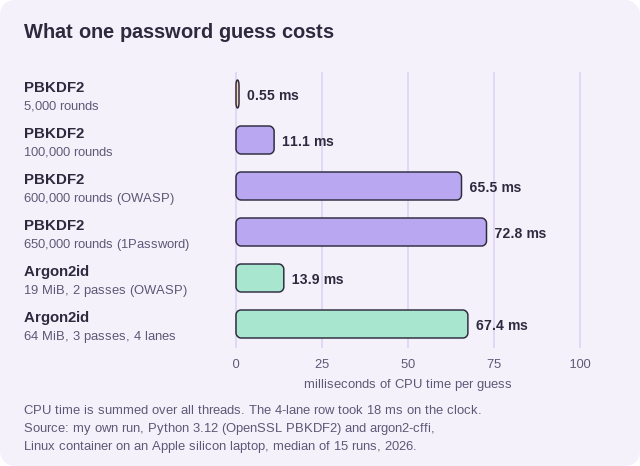
PBKDF2 grows in a straight line: 20 times the rounds costs about 20 times the time. That is also the cost for the attacker, on a CPU. The chart does not show the real difference between PBKDF2 and Argon2id, because that difference is memory, not time. Argon2 is what RFC 9106 calls “a memory-hard function”: each guess must hold a block of memory (19 MiB or 64 MiB above) while it works. A graphics card has thousands of cores but a limited pool of memory, so a guess that needs tens of megabytes limits how many can run side by side. PBKDF2 needs almost no memory, which is why graphics cards are good at it. RFC 9106’s two recommended settings use 2 GiB or 64 MiB of memory, far above the OWASP minimums in the table.
If the server is copied
Now the part that many explainers skip. Suppose someone gets a copy of the server’s data.
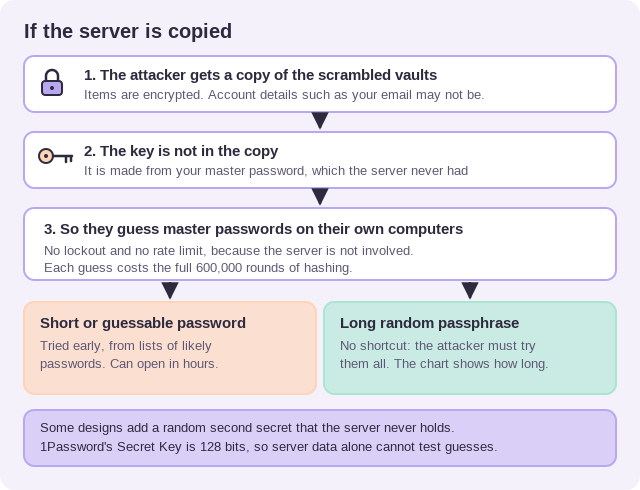
They have scrambled vaults. They do not have the key. The only way to get it is to guess the master password: derive a key from the guess, try it on the vault, see if it works. This happens on the attacker’s own computers, so there is no login page to lock them out and no limit on tries. The server is not involved at all. This is called an offline attack, and the only brake on it is the cost of each guess.
So how much does the slowness buy? For a number, I used a public benchmark. A hashcat run on one NVIDIA RTX 4090 graphics card, published as a GitHub gist, measured PBKDF2-HMAC-SHA256 at 8,865.7 kH/s, about 8.87 million guesses a second, with each guess being 999 rounds. Cost scales with the number of rounds, so I divided: at 600,000 rounds that card does about 14,800 guesses a second. At 5,000 rounds it does about 1.8 million.
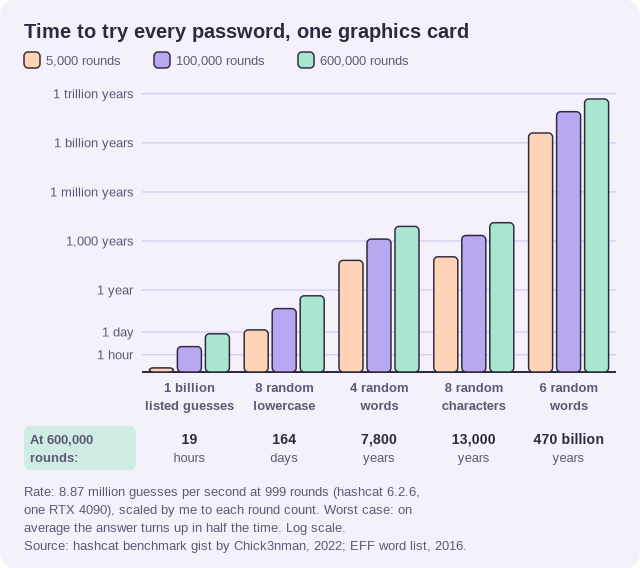
How to read it. The axis is logarithmic, so each gridline is far above the one before. The groups on the bottom are the sets of passwords the attacker has to try:
- 1 billion listed guesses is a round number I picked, standing for a password that sits on a list of likely passwords. At 600,000 rounds it takes about 19 hours to try them all. At 5,000 rounds it takes about 9 minutes.
- 8 random lowercase letters is 26 to the power of 8, about 209 billion options.
- 4 random words and 6 random words come from a 7,776-word list, such as the long list from the EFF. The EFF says each word adds about 12.9 bits, and each extra bit doubles the guesses an attacker needs. Six words give about 77 bits.
- 8 random characters is 94 keyboard characters to the power of 8.
Four things to know before trusting any of it.
- It is one card, and it is the worst case. On average an attacker finds the password halfway through. A real attacker can rent many cards, and the time divides by the number of cards. Ten thousand cards turn the 4-word figure from 7,800 years into about 9 months. Six words are still tens of millions of years.
- The groups assume the password is random. People are not random. They add a number to a name, or reuse an old password with a change. An attacker tries those patterns first. The “listed guesses” group is closer to how a human-made password behaves than the 8-random-characters one.
- The scaling is my arithmetic. The benchmark ran 999 rounds. I assumed the cost grows in a straight line with the rounds, which holds for PBKDF2. Treat the numbers as a size, not a measurement of any real attack.
- The rounds multiply the time, not the password. Going from 5,000 to 600,000 rounds makes every row 120 times longer. For a password on a list, that turns minutes into hours. It does not make a listed password safe.
The 1Password design document is blunt about this. It says its slow hashing “goes some way to increase the work” an attacker needs, but “cannot substitute a strong account password”. It then adds a second protection for this exact case. Your account password is combined with a Secret Key, a random 128-bit value that is kept on your devices and not on the server. The document says an attacker who captures only server data would have to guess the password and also have the Secret Key, and that “the information held on our systems cannot be used to check whether an account password guess is correct or not.” The cost: you have to keep the Secret Key safe yourself, and it does nothing if your own device is compromised.
Where it breaks
The design protects against a copied server. These cases it does not cover:
- A weak or reused master password. Everything above depends on it. The KDF only slows the guessing down.
- Your own device. When the vault is open, the key and the decrypted logins are in memory. Malware on that device sees what you see. Neither vendor’s design claims otherwise. 1Password says plainly that the Secret Key plays no part if your own system is breached.
- The app you run. The encryption happens in code the vendor ships. If that code were changed to send the master password, the design would not help. Some vendors publish their client code and commission audits, so that others can check what it does.
- Old settings. A vault made years ago may use fewer rounds, because the count is stored per account. Check your own account’s setting rather than assume it moved.
- What is not encrypted. As above, some account details are stored in the clear. The server can also see when you sync and roughly how large the vault is.
What passkeys change
A password is a shared secret. You and the site both know it, so the site has to store something derived from it, and an attacker who steals that has something to crack. A passkey removes the shared secret. The FIDO Alliance, which develops the passkey standards, says passkeys are “designed so that there are no shared secrets”.
Under the hood, a passkey is a key pair: two linked keys made together. The private key signs. The public key checks the signature. Anything signed with the private key can be checked with the public key, but the public key cannot be used to sign. The W3C’s Web Authentication standard (WebAuthn) describes it with two parties: the relying party (the website) and the authenticator (the thing that holds the private key, such as a phone, a laptop or a hardware key).
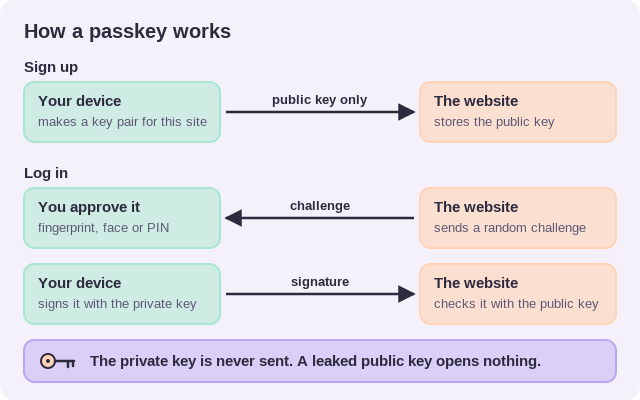
At sign-up the device makes a pair for that site. The standard says the server “stores the credential public key in its database and associates it with the user”. At log-in the site sends a random challenge. Your device signs it after you approve with a fingerprint, face or PIN. The site checks the signature with the stored public key.
Compare that with a copied server. A copy of the passkey table holds public keys. There is nothing to guess and nothing that can sign. The challenge is a fresh random number each time, so a recorded login cannot be played back. The site has to hand out each challenge once and check it, the opposite problem from the one in idempotency keys explained, where a repeated request has to be accepted safely.
The address check
The part that matters for phishing is where the site address comes from. When
your browser asks the device to sign, it adds the address of the page into the
data that gets signed. WebAuthn calls this the origin. The login step in the
standard (section 7.2) has the server check the type, the challenge and the
origin, then verify the signature. The data looks like this, simplified:
{
  "type": "webauthn.get",
  "challenge": "dGhpcyBpcyBhIHJhbmRvbSBudW1iZXI",
  "origin": "https://bank.example"
}
Each credential is also scoped to a Relying Party ID, in practice the site’s domain. The standard says the ID must equal the origin’s domain or a parent domain of it, and that the credential “can only be accessed by origins belonging to that Relying Party”.
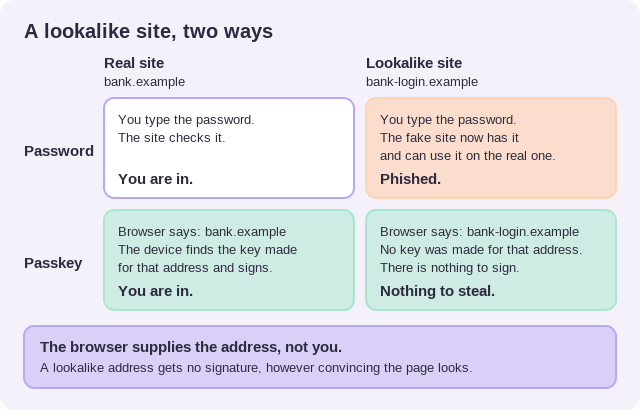
You type a password into whatever page is in front of you, so a good enough
copy of the page gets it. A passkey does not depend on what you think the page
is. The browser reports the real address, and a device has no key for
bank-login.example. Nothing is left to hand over. The FIDO Alliance calls
phishing resistance “a core design goal”.
Passkeys and password managers together
They are not rivals. A passkey has to live somewhere. FIDO says it can be “securely synced across a user’s devices, or bound to a particular device”. Bitwarden’s passkey help page says passkeys saved in Bitwarden are protected with its end-to-end encryption and synced between your devices.
That changes the plain wording “the private key never leaves the device”. For a device-bound passkey, such as one on a hardware key, it is true. The standard says the private key is “expected to never be exposed to any other party, not even to the owner of the authenticator”. For a synced passkey, copies of the private key travel, encrypted, through the sync. You are back to the first half of this post: the passkey is only as safe as the vault that holds it, and the vault is only as safe as its master password.
Questions people ask
Can a password manager company see my passwords? In the designs described here, no. The vault is encrypted on your device with a key made from your master password, and the server never receives the password or the key. The company can still see some account data, such as your email address. Check the vendor’s white paper for the exact list.
What happens if a password manager is hacked? It depends on what was taken. A copy of the server gives the attacker locked vaults, and they then try to guess master passwords offline. The slow key derivation sets the cost per guess, and the strength of your master password sets how many guesses it takes. A weak one can fall in hours. A long random one holds, going by the chart above. If your own device is infected, the server’s design does not matter.
Is PBKDF2 or Argon2id better? Argon2id is built to need a lot of memory per guess, which makes graphics cards less useful for guessing. RFC 9106 gives recommended Argon2id settings, and OWASP lists it first. PBKDF2 is simpler and has FIPS 140 validated implementations, which is why OWASP says to prefer it where that is required. Both are fine at the vendors' default settings. The weakest link is still the master password.
Does a passkey replace my password manager? No. A passkey replaces the password for one site. Something still has to hold the passkeys, and many people use their password manager for that. The vault itself is still protected by the master password.
Why does my vault take a moment to open? That pause is the key derivation. On my laptop 600,000 rounds of PBKDF2 took about 67 ms. A slower phone takes longer. The cost is the same one the attacker pays on every guess.
Cheat sheet
Further reading
- Bitwarden security white paper
- Bitwarden: encryption key derivation (KDF algorithms)
- Bitwarden: storing passkeys
- 1Password security design: making verifiers uncrackable with 2SKD
- 1Password security design: vulnerability of server data
- OWASP password storage cheat sheet
- RFC 8018: PKCS #5, password-based cryptography
- RFC 9106: Argon2
- W3C Web Authentication, level 2
- FIDO Alliance: passkeys
- EFF: new wordlists for random passphrases
- Idempotency keys explained on this site, for the other side of the “same request twice” problem

Backend engineer who builds high-volume systems that move money. More about Rafi